
draft-reasoned_extraction_udemy
Crash Course
Welcome
Welcome
In about one hour you will evaluate LLMs on real V-safe neuropathy narratives using browser review tools—not generic chat demos.
You will compare DeepSeek v4 to closed-weight models (Claude, GPT, Gemini) with citation-backed tables, a three-model gold panel, and field-level summaries.
Prerequisites: a browser; basic JSON fields (value, explanation, citation). No programming required for this track—the tools run in the browser. Building the full pipeline from scratch involves code; this course focuses on the visual workflow and how comparison works.
Demo — Gold Review at a Glance
Demo — Gold Review at a Glance
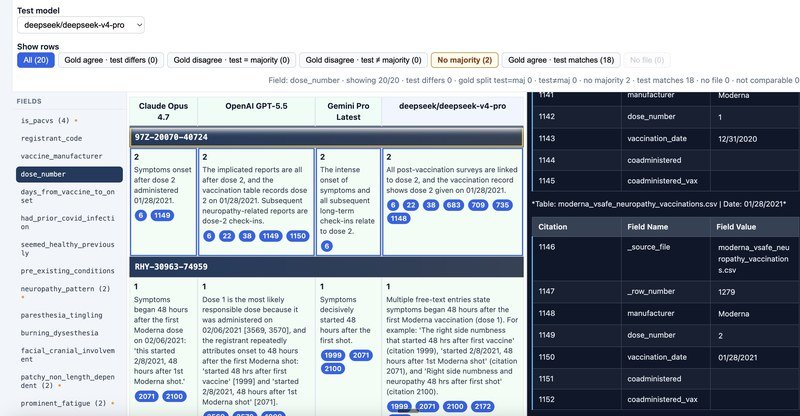
Open gold_review.html first—this is the main place you see model outputs side by side.
What you are looking at
- Three gold columns — reference runs (Claude Opus, GPT-5.5, Gemini Pro in the default bundle).
- One test column — your candidate (for example DeepSeek v4 Flash), chosen from the toolbar.
- Each row — one registrant; the active field tab shows how every model answered that PACVS field for that person.
Screen regions
| Region | Role |
|---|---|
| Toolbar | Test model, row filters, live stats |
| Field sidebar | PACVS fields; orange • marks fields with test mismatches vs agreeing gold |
| Comparison table | Gold + test cells (value, explanation, citation pills) |
| Markdown pane | Source narrative; pills jump to numbered cite rows |
The UI is read-only: it loads assessments in the browser and does not edit files on disk.
Later lessons define EXACT and RIGOUR and go deeper on filters and citations. For now, scan the layout and notice how much is visible in one screen.
Key takeaway: Gold review is the visual home base—three gold models vs one test, one field at a time.
The Four Review Pages
The Four Review Pages
| Page | Role |
|---|---|
gold_review.html |
3 gold + 1 test — per registrant (demo above) |
comparison.html |
Pick model pairs → Summary or Detailed |
summary.html |
Field-level counts vs gold (two models side by side) |
llm_compare/llm_compare.html |
Left vs right EXACT cells, registrant by registrant |
All four read the same assessments and source markdown. The Appendix — Background summarizes V-safe and PACVS if those terms are new.
For code and bundle generation, see the full Reasoned Extraction course—or contact the instructor for your use case.
Cost, Quality, and the Gold Panel
Cost, Quality, and the Gold Panel
Inference cost: DeepSeek v4–class models are often roughly 10× cheaper than the closed-weight references in the gold panel (OpenAI GPT, Anthropic Claude, Google Gemini Pro). At scale, that gap matters.
This course does not claim DeepSeek is perfect. Three closed-weight models are the gold panel; DeepSeek (or any candidate) is the test scored against them—that encodes a higher-trust reference tier, not “cheapest wins.”
Trade-off you will measure
- Gold tier — stronger baseline (gold can still split on ambiguous cases).
- Test tier — may diverge;
summary.htmland gold review show where and how often.
You may accept slightly lower alignment to gold for large savings when citation-backed review shows the gap is acceptable for your workflow.
Key takeaway: Decide if cheaper is good enough using gold-aligned metrics—not marketing.
EXACT & Gold Panel
Reasoned Extraction and EXACT
Reasoned Extraction and EXACT
Reasoned extraction means each PACVS field returns value, explanation, and citation—not a bare label.
EXACT — Explainable eXtraction Assessment using Citation Tables:
| Letter | Term |
|---|---|
| E | Explainable (explanation on every field) |
| X | eXtraction → PACVSNeuropathyCase JSON |
| A | Assessment (PACVS rubric, including is_pacvs) |
| C | Citation (indices into numbered source rows) |
| T | Tables — source cite table + review grid + summary.html rollup |
"is_pacvs": {
  "value": true,
  "explanation": "<p class='pacvs-summary'>…</p>…",
  "citation": [3, 7]
}
Key takeaway: Audit the citation table, not only the boolean.
Pipeline in One Pass
Pipeline in One Pass
- Manifest — fixed registrant set.
- V-safe markdown — narrative + numbered source citation table (column 1 = cite #).
- LLM extraction —
*.assessment.jsonper model and registrant. - Review UIs — gold review, comparison index, summary, detailed compare.
- Human review — filters, row colors, citation pills.
Default gold models: Claude Opus, GPT-5.5, Gemini. Test / left / right: DeepSeek v4 and other runs in the bundle.
Key takeaway: This crash course is steps 4–5 on the live bundle.
RIGOUR: Three Gold Models and One Test
RIGOUR: Three Gold Models and One Test
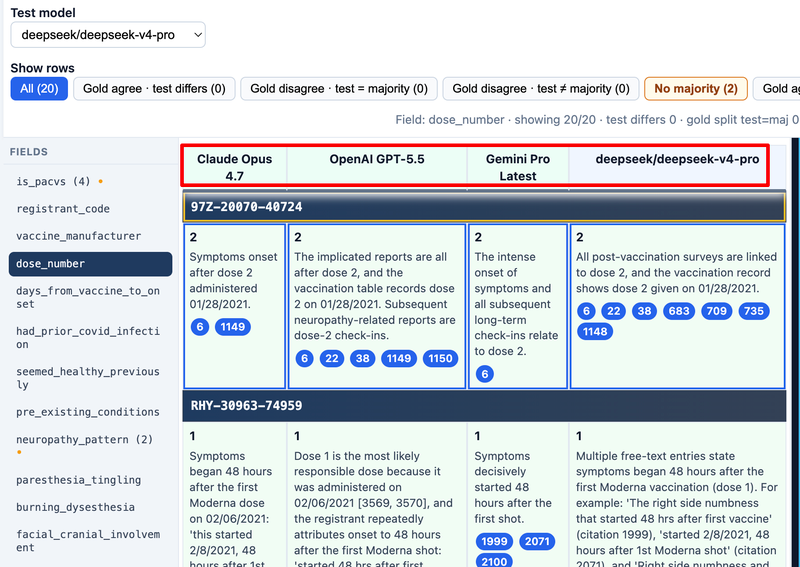
RIGOUR names the evaluation discipline that pairs with EXACT (what you inspect in each cell):
| Letter | Term | Meaning in this project |
|---|---|---|
| R | Reasoned | Gold and test outputs are reasoned extractions (value, explanation, citation)—not bare labels. |
| I | Inference | Each model infers PACVS fields from the same registrant narrative. |
| G | Gold-standard | A fixed panel of three reference models (Claude Opus, GPT-5.5, Gemini in the default bundle). |
| O | Outcomes | Per-field outcomes on each registrant: agree, split, majority match, not comparable. |
| U | Under | The test model is scored under that panel—one candidate column vs three gold columns. |
| R | Review | Human review in gold_review.html and summary.html: filters, row colors, citation checks. |
Full expansion: Reasoned Inference with Gold-standard Outcomes Under Review.
How it works in gold review
- Gold agree — all three gold values match → strong baseline.
- Gold split — gold disagree → check whether the test matches 2-of-3 majority.
- No majority — gold tie; read citations manually (gray / dedicated filter).
- Change only the test dropdown; gold columns stay fixed.
Short values (≤ ~20 characters in gold review) auto-compare; long text stays visible but may be not comparable (gray rows). The same agree / split / majority buckets appear as counts on summary.html.
Key takeaway: EXACT is what you read in each cell; RIGOUR is how you judge a test model against the gold panel.
Gold Review
EXACT Cells and Citations
EXACT Cells and Citations
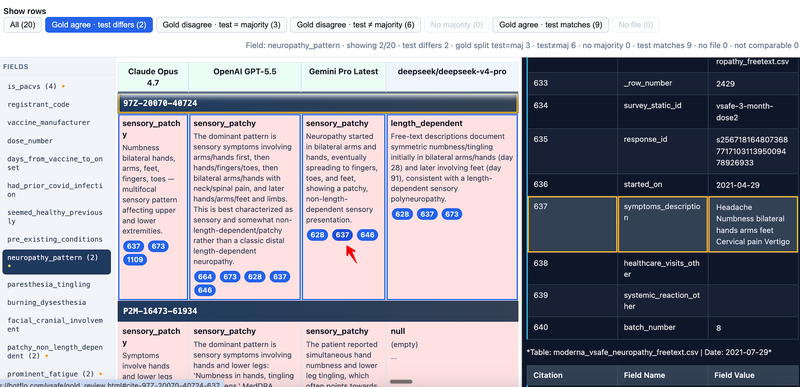
Back in gold_review.html (demo lesson): each table cell is one EXACT record.
- Value (bold)
- Explanation (often PACVS heuristic HTML; blue pacvs-summary when present)
- Citation pills → numbered rows in the markdown pane
- Click a registrant heading → load that person’s source narrative.
- Click a pill → jump to
cite-{slug}-{n}and highlight the row.
Key takeaway: Disagreements are settled in the source table, not by trusting prose alone.
Filters and Row Colors
Filters and Row Colors
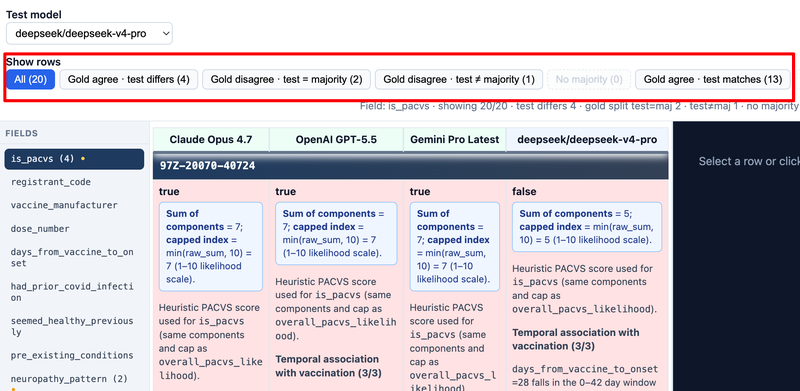
| Filter | When to use |
|---|---|
| Gold agree · test differs | First pass on a new model |
| Gold disagree · test = majority | Gold split; test tracks plurality |
| Gold disagree · test ≠ majority | Test outlier on a split |
| No majority | Tie — read citations manually |
| Color | Meaning |
|---|---|
| Green | Gold agree · test matches |
| Red | Gold agree · test differs |
| Yellow | Gold split |
| Gray | Not comparable |
Key takeaway: Red fixes the test model; yellow fixes your reading of the chart.
Hands-On: Five-Minute Gold Review
Hands-On: Five-Minute Gold Review
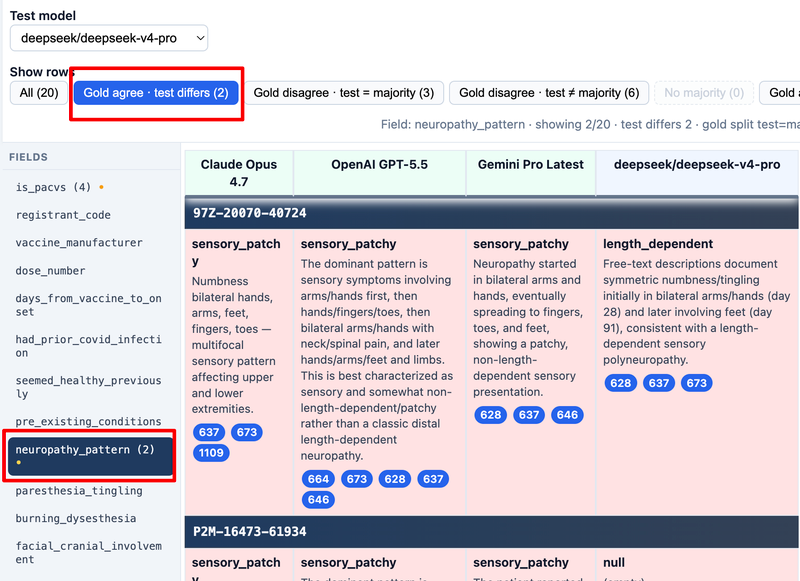
- Set test to DeepSeek v4 Flash (or your candidate).
- Open
is_pacvs→ filter Gold agree · test differs. - For each row: compare cells → click citation pills.
- Repeat
recommend_compensation. - Note field tabs with • — weakest dimensions.
Key takeaway: Filtered gold review beats reading raw JSON.
Compare & Summary
comparison.html and summary.html
comparison.html and summary.html
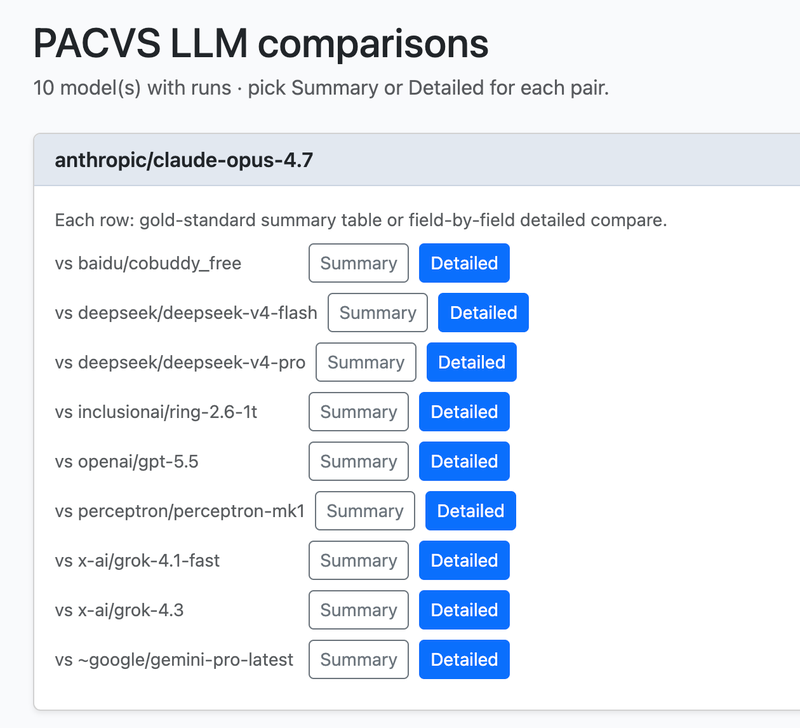
comparison.html — pick a model pair. Each row offers:
| Link | Page | Question |
|---|---|---|
| Summary | summary.html |
How often does each model match gold by field? |
| Detailed | llm_compare.html |
Who differs, with full EXACT cells? |
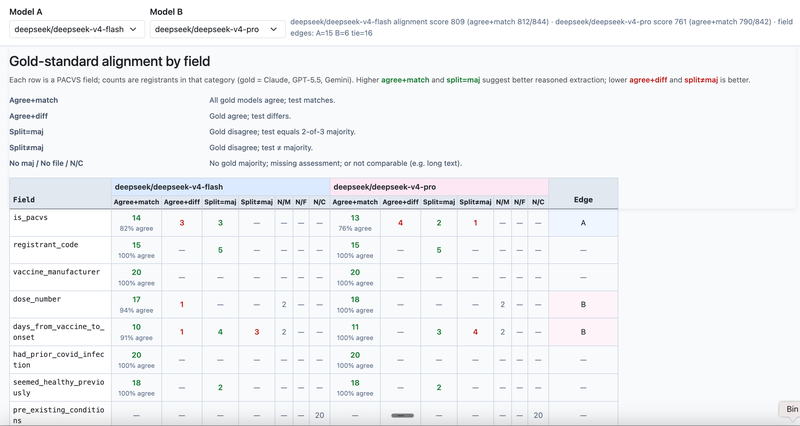
summary.html — Model A vs Model B, one row per PACVS field:
- Agree+match / Agree+diff — gold unanimous
- Split=maj / Split≠maj — gold split vs test
- Same gold panel as gold review; counts across the whole manifest
Optional: ?left=deepseek__deepseek-v4-flash&right=openai__gpt-5.5.
Key takeaway: Summary before detailed — find weak fields in seconds.
Detailed Compare and Which Tool When
Detailed Compare and Which Tool When
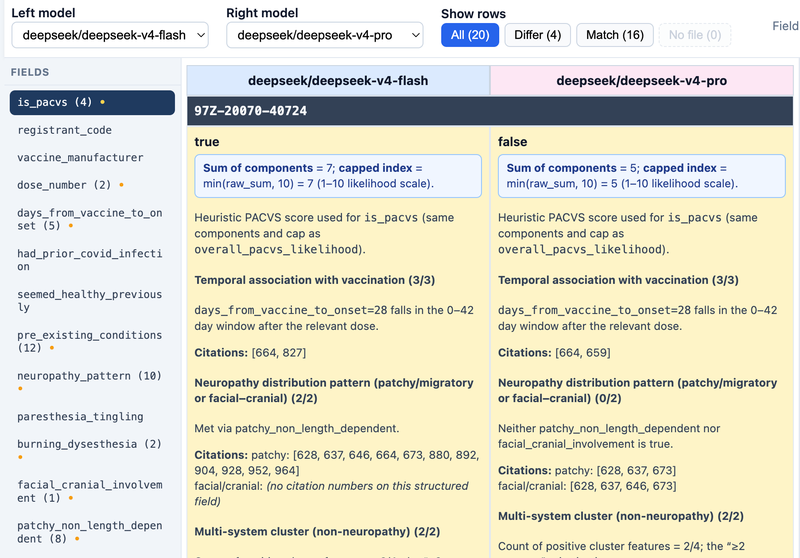
Detailed compare — left vs right (no gold columns):
- Filters: Differ, Match, No file
- Field tabs with • where models disagree
| Tool | Best for |
|---|---|
| Summary | Field-level scoreboard (two models) |
| Detailed | Registrant drill-down, Differ filter |
| Gold review | Official test vs 3-gold panel |
| Comparison index | Navigation |
Key takeaway: Summary = where; Detailed = who; Gold review = test vs gold on each person.
DeepSeek vs Closed-Weight: One Workflow
DeepSeek vs Closed-Weight: One Workflow
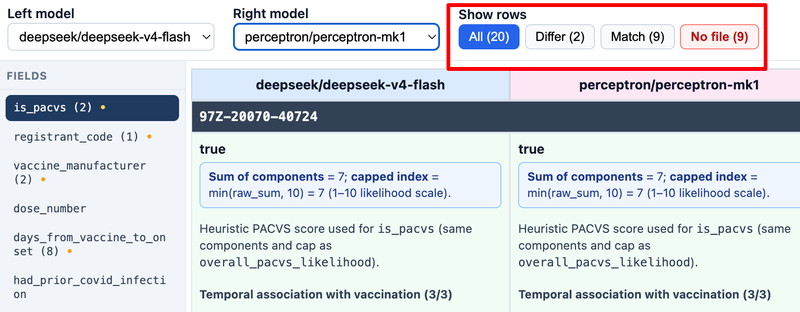
comparison.html→ DeepSeek vs GPT (or Claude).- Summary — fields with high Agree+diff / Split≠maj on DeepSeek.
- Detailed — Differ on those fields; verify citations.
- Gold review — same model as test; confirm Gold agree · test differs.
Show both aggregate counts and one cite-backed example when you report results.
Key takeaway: Never compare models on labels alone—use summary + citations.
Wrap-Up
Gold Split and Common Mistakes
Gold Split and Common Mistakes
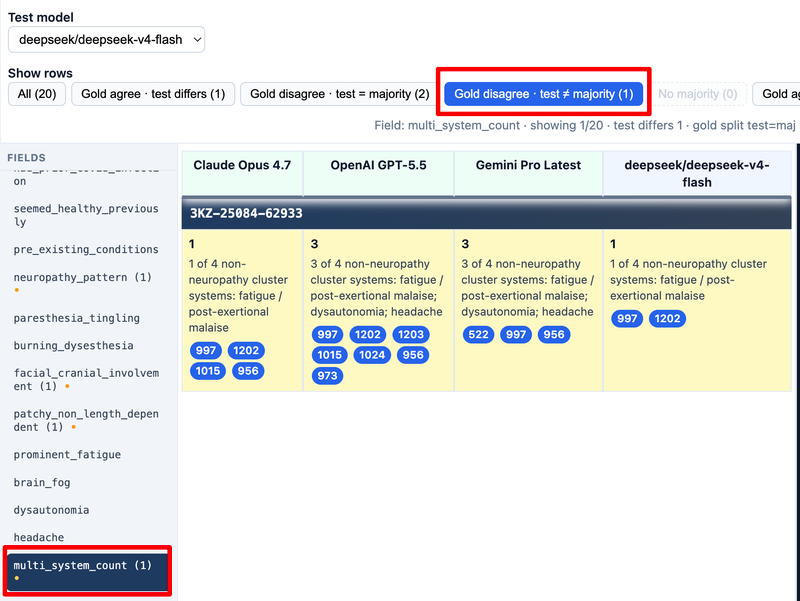
Gold split (yellow): gold models disagree. Check whether test = 2-of-3 majority before blaming the test model.
| Mistake | Fix |
|---|---|
| Value-only judgment | Read explanation + citations |
| Skipping summary | Run field rollup first |
| Treating yellow as “test wrong” | Adjudicate the narrative |
| Ignoring gray rows | Long fields still matter qualitatively |
Key takeaway: Same majority logic in gold review rows and summary columns.
End-to-End Checklist and Quick Reference
End-to-End Checklist and Quick Reference
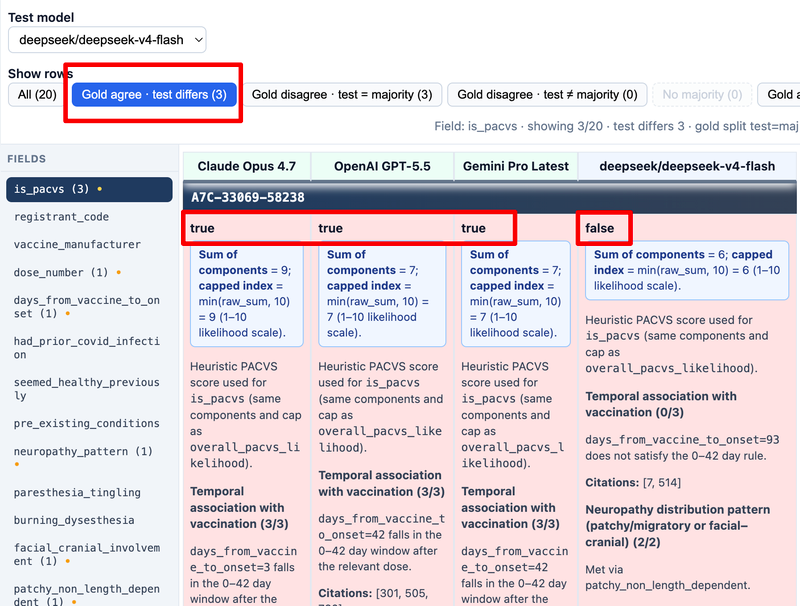
Checklist
comparison.html— both models have runs.summary.html— weak fields by count.- Detailed compare — Differ + citation check.
gold_review.html— test model, Gold agree · test differs.- Record field, registrant, and cite row for each finding.
Quick reference
| Tool | Purpose |
|---|---|
gold_review.html |
3 gold + 1 test |
comparison.html |
Pair picker |
summary.html |
Field vs gold counts |
llm_compare.html |
Left vs right EXACT |
EXACT: explainable JSON → citation tables in the UI.
When reporting results to stakeholders, pair cost (e.g. ~10× lower inference for DeepSeek-class models vs the gold-tier APIs) with measured alignment (summary counts, gold agree · test differs, citation spot-checks)—not either one alone.
For code, PACVS rubric detail, and V-safe narratives, continue with the full Reasoned Extraction lesson set when you are ready to build or extend the bundle. For a specific domain or deployment, contact the instructor to adapt this evaluation pattern to your use case.
Appendix — Background
V-safe Overview
V-safe Overview
V-safe is the CDC’s smartphone program for active monitoring of COVID-19 vaccine safety. After vaccination, participants can report symptoms and follow-ups over time.
This course uses a small research sample of de-identified registrant stories related to neuropathy—not the live V-safe system and not the full national database.
What you see in the review tools
- Each registrant has a stable study code (shown as the row heading in gold review).
- The right-hand pane shows that person’s narrative—the same text models read during extraction.
- Numbered rows in the narrative are the source citation table. Citation pills in model cells jump to those row numbers so you can check whether a label matches the story.
What stories usually mention
- Vaccine product, dose, and timing
- Days from vaccination to symptom onset
- Neuropathy quality (tingling, burning, patchy vs widespread, facial involvement)
- Other symptoms (fatigue, brain fog, headache, dysautonomia-like features)
- Competing explanations (prior COVID, diabetes, B12, thyroid, and similar)
Structured PACVS fields (Appendix lesson on PACVS) are an interpretation of this narrative. The narrative remains the source of truth when models disagree.
Scope limits
- Study codes only—no re-identification of individuals.
- Research and model comparison—not clinical decision support or official pharmacovigilance workflow.
PACVS Overview
PACVS Overview
PACVS (Post-Acute COVID-Vaccination Syndrome) is a clinical pattern used here to classify certain neuropathy presentations after COVID-19 vaccination—especially when symptoms cluster with other systemic features and onset is close in time to a dose.
The review tools show one PACVS assessment per model per registrant: many fields (timing, pattern, cluster symptoms, objections, compensation stance) plus a top-level is_pacvs judgment.
Distinctions the rubric keeps in play
- PACVS neuropathy (
is_pacvstrue) — meets the project threshold on structured criteria - Vaccine-related neuropathy, not full PACVS — injury after vaccine without the full pattern
- Overlap but low likelihood — some features, not a clear case
- Ordinary or alternative neuropathy — other diagnoses and “why not PACVS” reasoning
Gold review shows how different LLMs apply the same rubric to the same V-safe story.
Themes you will see as field tabs
- Timing and vaccine context (manufacturer, dose, days from vaccine to onset)
- Neuropathy pattern (small-fiber, patchy, facial/cranial, burning, and similar)
- Multi-system cluster (fatigue, brain fog, dysautonomia, headache)
- Severity and course
- Objections and alternative causes
- Compensation recommendation (separate clinical judgment—not auto-set from the score)
- Overall likelihood (1–10) and
is_pacvs
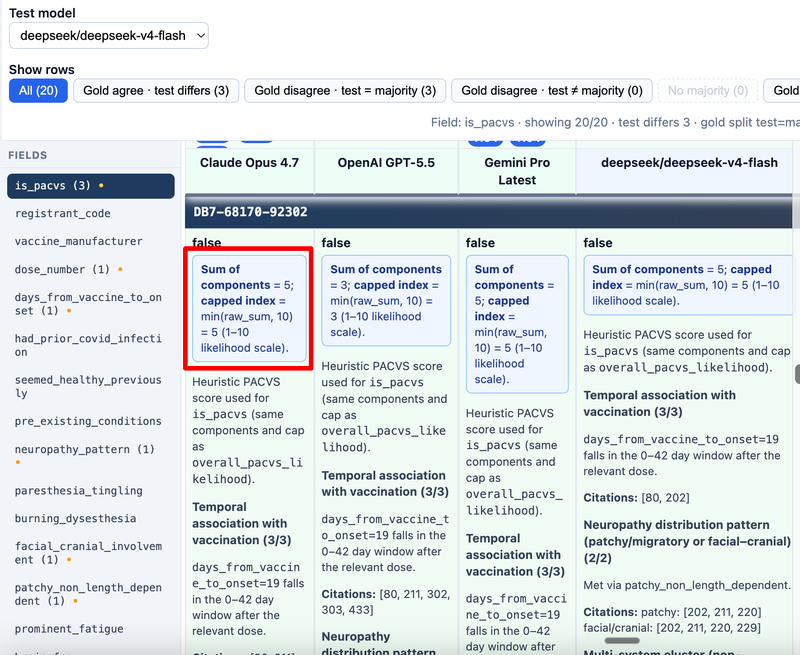
Heuristic score (why explanations look like “3/3 temporal”)
A transparent point system (max 10) drives overall_pacvs_likelihood and is_pacvs (typically ≥ 7 means PACVS on current rules). Points come from, for example:
- Strong temporal link (onset within 42 days of the relevant dose)
- Patchy or facial/cranial pattern
- Multi-system cluster (two or more of fatigue, brain fog, dysautonomia, headache)
- Other common causes ruled out
Models often show this breakdown in the blue pacvs-summary line and score blocks inside the cell explanation. You still read citations to confirm the story supports the points.
Key takeaway: PACVS here is a structured, auditable rubric—not a single chat answer. EXACT fields let you see value, reasoning, and source lines for each piece of that rubric.