
draft-reasoned_extraction
Demo — Gold Review
Purpose of This Chapter
Purpose of This Chapter
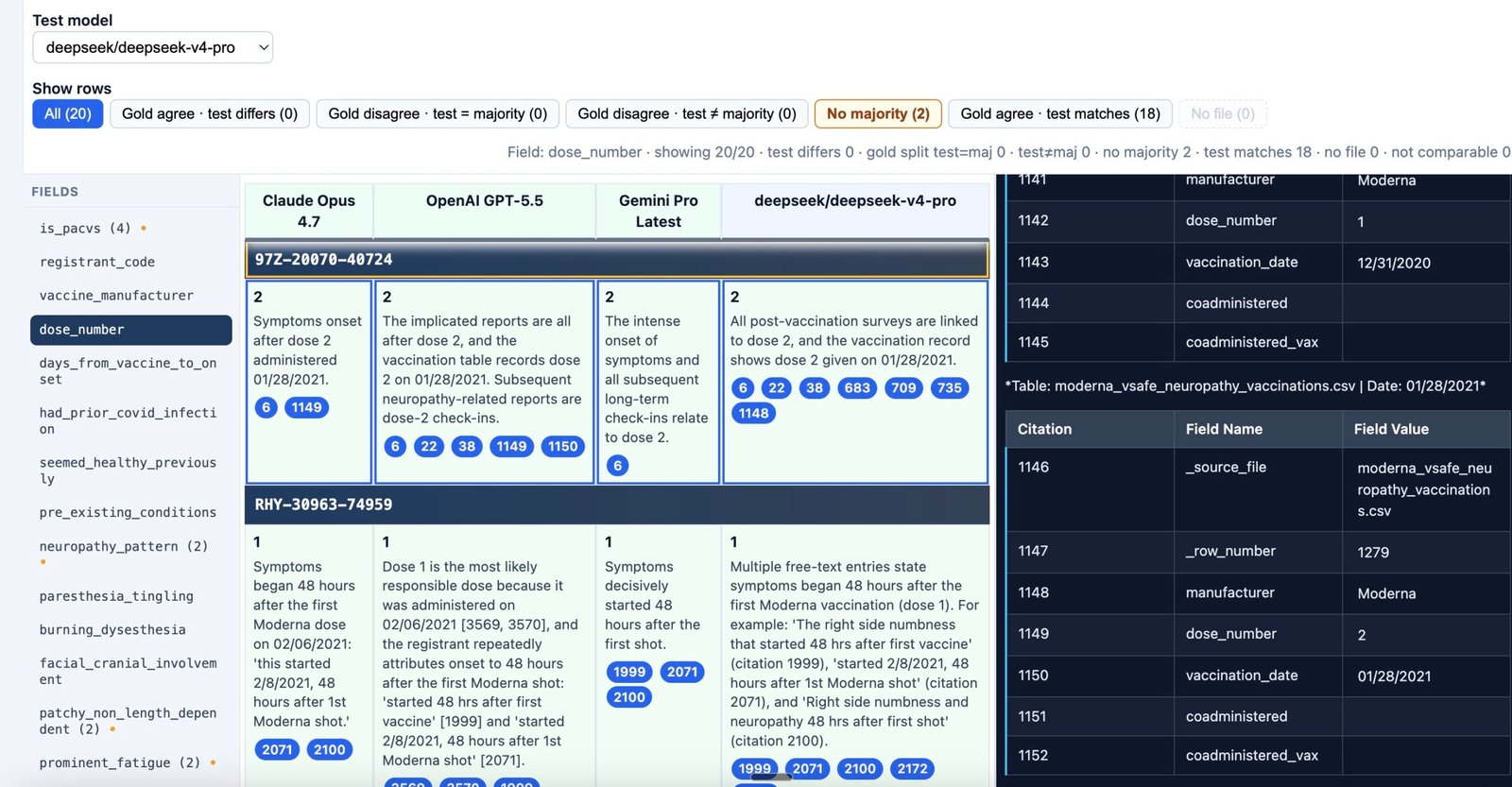
Demo — Gold Review is a compact map of gold_review.html: what each part of the screen is for and how the pieces fit together. It supports live walkthroughs and stands alone as published lesson notes.
The UI is the main place you read EXACT outputs—explainable extractions laid out as citation tables (registrant rows × model columns, with citation pills into numbered source markdown). Chapter 1 defines that term; this chapter shows where it appears on screen.
Chapter 2 — Gold Review Tool covers the same application in full—toolbar, controls, citations, workflows, and review patterns. This demo chapter is not a substitute for that reference.
What the Gold Review Tool Compares
What the Gold Review Tool Compares
gold_review.html audits reasoned PACVS extractions—structured JSON with value, explanation, and citation per field (see Chapter 1).
The layout is fixed by design:
- Three gold columns — reference runs (Claude Opus, OpenAI GPT, Gemini Pro in the default bundle).
- One test column — any other model in the published bundle, selected from the toolbar.
Each row is one manifest registrant. Within a row, the active field tab shows how every model answered that PACVS field for that person. The question being answered is whether the test model aligns with consensus gold, and where it diverges.
Screen Layout
Screen Layout
| Region | Role |
|---|---|
| Toolbar | Test model selection and row filters for the active field |
| Field sidebar | PACVS schema fields; one field drives the whole table |
| Comparison table | Registrant blocks: heading row plus gold and test cells |
| Markdown pane | Pre-rendered V-safe source narrative for the selected registrant |
| Stats | Counts for shown rows, mismatches, gold splits, matches, missing files, not comparable |
The UI is read-only: it loads assessments over HTTP and does not edit JSON on disk.
Test Model Selection
Test Model Selection
The Test model control swaps which run directory populates the test column. Gold columns stay on the three reference models.
Changing the test model recomputes row styling, filter counts, and field-tab mismatch indicators for the same registrants and fields. That makes it straightforward to evaluate multiple candidate models against the same gold panel without leaving the page.
Field Sidebar
Field Sidebar
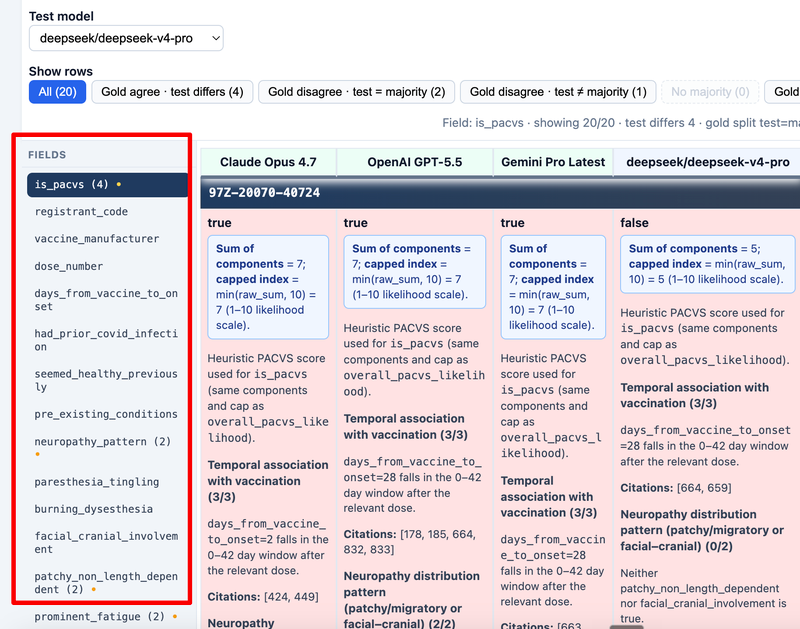
Each sidebar entry corresponds to one PACVSNeuropathyCase field. The table always reflects the currently selected field across all registrants.
Entries can show a mismatch marker (orange dot and count) when at least one registrant has gold agree · test differs for that field—gold models match on the comparable value, but the test model does not.
High-signal fields for review often include is_pacvs, overall_pacvs_likelihood, neuropathy_pattern, multi_system_count, and recommend_compensation, though the full schema is available tab by tab.
Row Filters
Row Filters
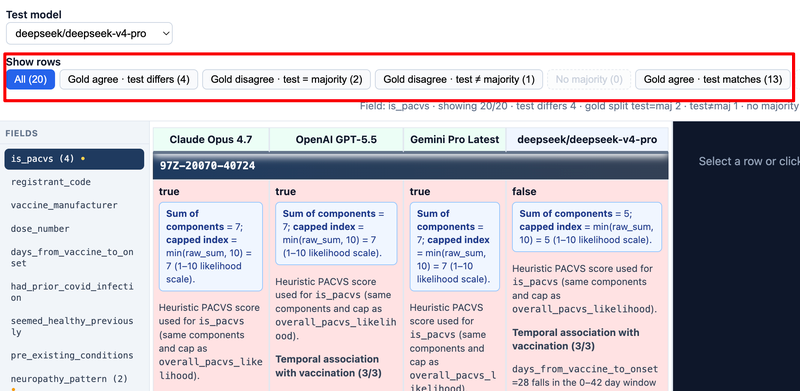
Filters apply to the active field only. Button labels include live counts.
| Filter | Meaning |
|---|---|
| All | Every registrant for this field |
| Gold agree · test differs | Gold consensus; test value disagrees |
| Gold disagree · test = majority | Gold split; test matches plurality gold value |
| Gold disagree · test ≠ majority | Gold split; test disagrees with plurality |
| No majority | Gold models disagree with no clear majority |
| Gold agree · test matches | Gold consensus; test agrees |
| No file | Missing assessment JSON on the test (or relevant) side |
Chapter 4 explains how rows are classified and when a row is not comparable (often long free-text fields).
Comparison Cells
Comparison Cells
Each model cell in the data row is one cell in the review citation table—a miniature EXACT view (see Chapter 1):
- Value — normalized answer (boolean, number, enum, or short text).
- PACVS summary — when present in the explanation HTML, shown in a blue callout at the top of the cell.
- Explanation — remaining heuristic or narrative HTML (including
pacvs-score-blocksections where generated). - Citation pills — numeric links into the source citation table in the markdown pane (
cite-{slug}-{n}anchors).
Gold and test cells for the same registrant and field are meant to be read side by side, then checked against the numbered rows in the source narrative.
Source Markdown and Citations
Source Markdown and Citations
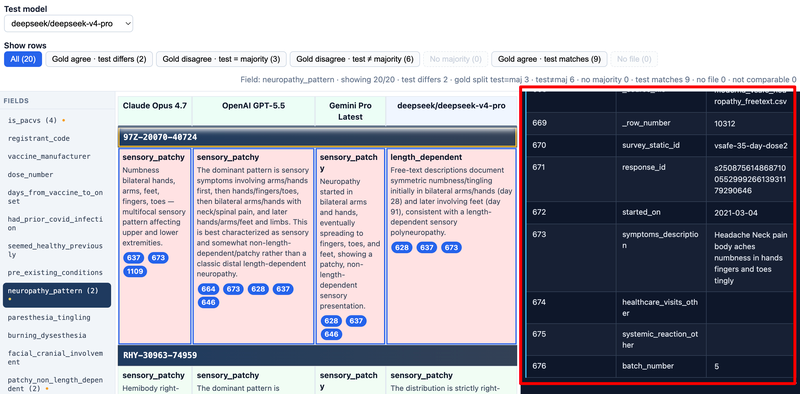
The markdown pane loads markdown/{slug}.html for the selected registrant—the same V-safe story the models read during extraction.
Selecting a registrant heading loads that narrative. Citation pills scroll the pane to the matching numbered row and briefly highlight it. That link is the audit trail between structured output and free-text evidence (see Appendix — V-safe).
Row Highlighting
Row Highlighting
Row background color encodes comparison kind for short, comparable values:
| Appearance | Typical meaning |
|---|---|
| Green | Gold agree; test matches |
| Red | Gold agree; test differs |
| Yellow | Gold models disagree (gold split) |
| Gray | Not auto-comparable |
| Red tint / no file control | Missing *.assessment.json for that model |
Yellow rows often warrant human adjudication among gold interpretations, not only test-model correction. Full rules are in Chapter 4 — Comparison Logic.
How This Chapter Fits the Set
How This Chapter Fits the Set
| Topic | Chapter |
|---|---|
Demo map of gold_review.html |
Demo — Gold Review (this chapter) |
| EXACT, PACVS JSON, pipeline, gold vs test | Chapter 1 — Reasoned Extraction Overview |
| Gold review controls and workflow | Chapter 2 — Gold Review Tool |
comparison.html, summary.html, detailed pair compare |
Chapter 3 — LLM Comparison Tool |
| Filter and majority logic | Chapter 4 — Comparison Logic |
| Python pipeline | Chapter 5 — Code Walkthrough |
| V-safe narratives | Appendix — V-safe |
| PACVS rubric and scoring | Appendix — PACVS |
Reasoned Extraction Overview
What Reasoned PACVS Extraction Is
What Reasoned PACVS Extraction Is
Reasoned extraction means an LLM does not only emit a final label—it returns a structured PACVS assessment where every important field carries:
value— the normalized answer (bool, int, enum, or short text)explanation— why the model chose that value, often with PACVS heuristic HTMLcitation— one or more indices into the source registrant narrative
The schema is PACVSNeuropathyCase. It encodes V-safe neuropathy review concepts: vaccine timing, symptom pattern, multi-system cluster, objections, compensation stance, and the top-level is_pacvs determination.
This tutorial set explains that pipeline and the gold review browser tool that compares multiple model runs side by side.
The next lesson introduces EXACT—the shorthand we use for this pattern across extraction, JSON, and review UIs.
EXACT: Explainable eXtraction Assessment using Citation Tables
EXACT: Explainable eXtraction Assessment using Citation Tables
EXACT names the workflow this course teaches:
| Letter | Term | Meaning in this project |
|---|---|---|
| E | Explainable | Every PACVS field ships with an explanation (often PACVS heuristic HTML), not only a bare value. |
| X | eXtraction | An LLM reads registrant markdown and emits validated PACVSNeuropathyCase JSON per model and registrant. |
| A | Assessment | Outputs follow the PACVS neuropathy rubric—timing, symptoms, clusters, objections, compensation stance, and is_pacvs. |
| C | Citation | Each field lists citation index(es) pointing at numbered rows in the source narrative. |
| T | Tables | Evidence and review are organized as citation tables—numbered rows you can jump to from the UI. |
Full expansion: Explainable eXtraction Assessment using Citation Tables.
Two kinds of citation table
- Source citation table — In each registrant markdown file, narrative evidence is often laid out as a pipe table whose first column is a citation number (1, 2, 3, …). Models must cite those indices in JSON; auditors read the same rows during review (see Appendix — V-safe).
- Review citation table — In gold review and LLM compare, the main grid is a table of registrants × models. Each cell is a small EXACT record: value, explanation, and citation pills that scroll the right-hand markdown pane to
cite-{slug}-{n}anchors. Side-by-side cells let you compare explainable extractions for one PACVS field at a time.
Why “tables” and not only “traceability”
PACVS review is visual and tabular: you scan rows of registrants, compare gold vs test columns, click citations to verify claims against numbered source lines, and use summary.html for a field-level rollup of gold alignment across the manifest. Citation tables captures the numbered source layout, the comparison grid, and that summary table—without reducing explainability to a single score.
How EXACT connects to the rest of this course
- Chapters 2–4 — Operate on review citation tables (filters, row colors, majority rules).
- Chapter 3 — Comparison index, field-level summary vs gold, and pairwise LLM compare (detailed cells).
- Chapter 5 — Code that builds source markdown, runs extraction, and publishes the review bundle.
- Appendices — V-safe narratives (source tables) and PACVS rubric (what each field means).
RIGOUR (optional companion term) stresses evaluation discipline: three gold models, one test model, and filters for agreement and majority. EXACT stresses what you produce and inspect: explainable, cited, table-shaped assessments.
Citable Fields and Assessment JSON Shape
Citable Fields and Assessment JSON Shape
Each PACVS field uses a citable wrapper (for example CitableBool, CitableStr):
"is_pacvs": {
  "value": true,
  "explanation": "<p class='pacvs-summary'>…</p>…",
  "citation": [3, 7]
}
At runtime the gold review UI turns each citable field into one review citation table cell (part of the EXACT pattern):
- Reads
valuefor display and for exact comparison when the serialized value is short enough. - Renders
explanationas HTML when it already contains PACVS markup; otherwise escapes plain text. - Turns
citationinto clickable pills that scroll the source markdown pane tocite-{slug}-{n}anchors on the source citation table.
Each model–registrant pair is stored as structured assessment JSON (one file per combination in the published neuropathy_llm_runs data). The review pages load these files in the browser.
End-to-End Pipeline from Manifest to Review UI
End-to-End Pipeline from Manifest to Review UI
The flow behind what you see on the site:
- Registrant set — a fixed manifest of V-safe cases included in the evaluation bundle.
- Source narratives — markdown chart text per registrant (shown in the right-hand pane during review).
- LLM extraction — each model produces a validated
PACVSNeuropathyCaseJSON assessment per registrant, with value, explanation, and citation on every field. - Published review tools — gold review (
gold_review.html), comparison index (comparison.html), pair summary (summary.html), and pair compare (llm_compare/llm_compare.html) load those assessments and narratives in the browser. - Human review — auditors compare models on review citation tables: filters, row highlighting, and citation pills linked to numbered source rows.
Together, steps 3–5 implement EXACT end to end: explainable JSON extractions, backed by source citation tables, inspected in the review UI.
Gold models are fixed (Claude Opus, OpenAI GPT, Gemini Pro in the default bundle); other models in the dataset appear as selectable test or left/right models in the comparison tools.
Why Three Gold Models Plus One Test Model
Why Three Gold Models Plus One Test Model
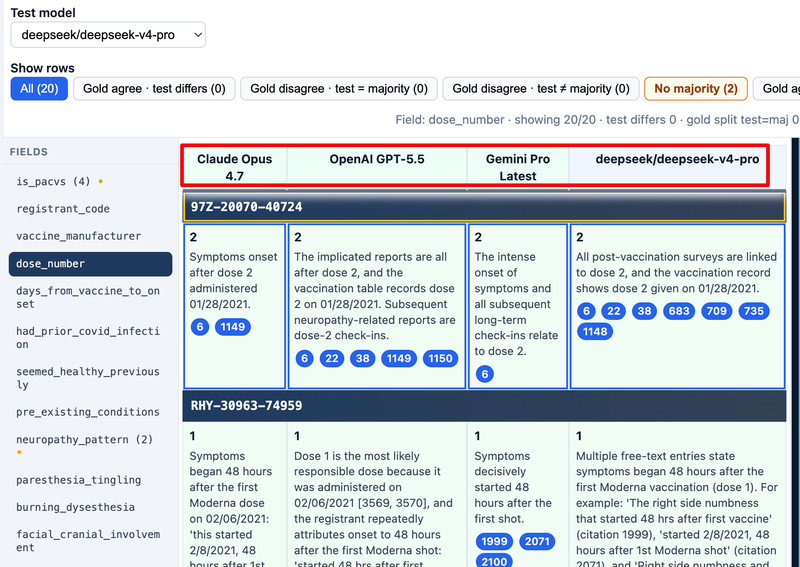
The review UI treats three independent gold extractions as a reference panel:
- When all three gold values agree on a field, that row is a strong consensus baseline.
- When gold models disagree, the UI classifies whether the test model matches the majority gold value or not.
- When gold disagree and there is no majority, the row is flagged as no majority (tie or split vote).
You pick the test model from the toolbar dropdown to evaluate a candidate model (for example DeepSeek) against that gold panel—without re-running gold models each time.
Short values (display length ≤ compareMaxLen, default 20 characters) participate in automatic agree/mismatch coloring; longer free-text fields are shown but not auto-compared.
How This Chapter Set Is Organized
How This Chapter Set Is Organized
- Demo — Gold Review — compact feature map of
gold_review.html(not a substitute for Chapter 2). - Chapter 1 (this file) — concepts: EXACT (explainable extraction + citation tables), citable PACVS schema, pipeline, and gold-vs-test purpose.
- Chapter 2 (Gold Review Tool) — full reference: toolbar, table, citations, workflow.
- Chapter 3 (LLM Comparison Tool) —
comparison.htmlindex,summary.htmlfield rollup vs gold, and detailed pair compare. - Chapter 4 (Comparison Logic) — row colors, filter buttons, majority rules, and when rows are “not comparable” (gold review).
- Chapter 5 (Code Walkthrough) — Python scripts: V-safe markdown → OpenRouter extraction → review bundle.
- Appendix — V-safe — what registrant narratives are and how they feed the review UI.
- Appendix — PACVS — clinical rubric, heuristic scoring, and how schema fields map to gold review.
The Demo chapter is a good entry point for the gold review screen; Chapter 1 for concepts, Chapter 2 for day-to-day use, Chapter 5 for implementation detail, Chapters 3–4 and appendices as needed.
Gold Review Tool
How This Chapter Relates to the Demo
How This Chapter Relates to the Demo
Demo — Gold Review (the chapter before Chapter 1) is a compact feature map of the same UI—layout, filters, cells, citations, and row highlighting—written for published lesson notes and live walkthroughs.
This chapter is the full reference for every control, citations, row highlighting, and a typical review workflow.
It assumes the EXACT model from Chapter 1: explainable PACVS JSON (value, explanation, citation) displayed in citation tables—the comparison grid plus the numbered source pane.
Toolbar: Test Model and Row Filters
Toolbar: Test Model and Row Filters
The top bar controls what you see for the active PACVS field (selected in the left sidebar):
| Control | Purpose |
|---|---|
| Test model | Dropdown of models in the published bundle (excluding the three gold reference models). Changes which column is compared against gold. |
| Show rows | Filters registrants by comparison outcome for the current field. Counts update per filter. |
| Stats (right) | Live summary: shown rows, mismatches, gold splits, matches, missing files, not comparable. |
Filter presets include All, Gold agree · test differs, Gold disagree · test = majority, Gold disagree · test ≠ majority, No majority, Gold agree · test matches, and No file (test assessment missing).
Use filters to focus review time on disagreements or missing runs instead of scrolling every registrant.
Field Sidebar and Comparison Table
Field Sidebar and Comparison Table
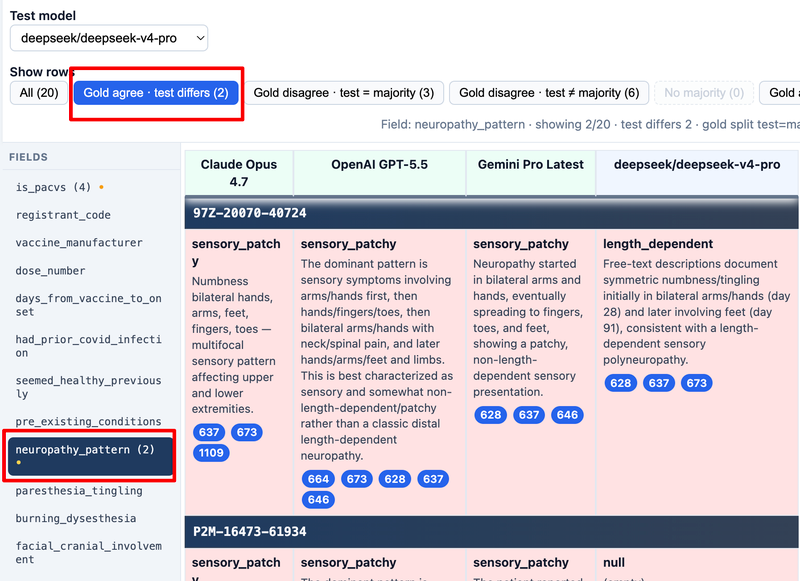
Field sidebar — one button per PACVSNeuropathyCase field from config. The active field is highlighted. Fields with any gold agree · test differs rows show an orange • and a mismatch count in the label (for example is_pacvs (2)).
Table layout for each registrant:
- Heading row — registrant code (click to select and load source markdown).
- Data row — one cell per gold model + one cell for the selected test model.
Each cell is one entry in the review citation table (one EXACT assessment for that model, registrant, and field):
- Value (bold) — extracted answer
- PACVS summary (when present in explanation HTML) — blue callout at top of cell
- Explanation — remaining heuristic or prose HTML
- Citation pills — numbered links into the source citation table in the markdown pane
Row background color reflects comparison kind (match, test mismatch, gold split, not comparable, test missing file). Chapter 4 details the rules.
Source Markdown Pane and Citations
Source Markdown Pane and Citations
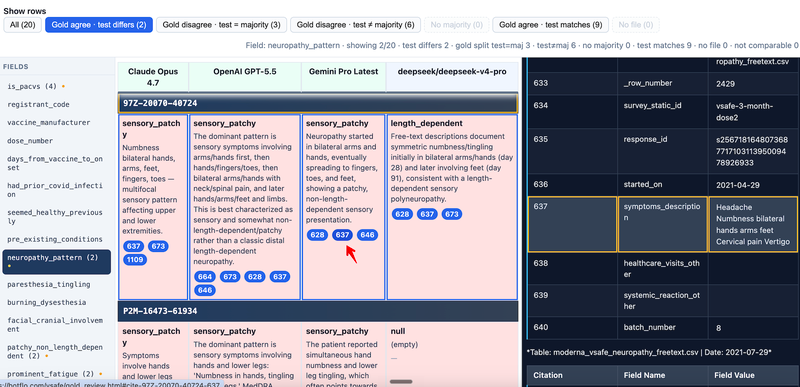
The right pane shows pre-rendered registrant source for the selected person—the same narrative the models cited during extraction.
Interaction flow:
- Click a registrant heading row or a citation pill → loads that registrant’s markdown into the pane.
- Click a pill with
href="#cite-{slug}-{n}"→ scrolls to the matching anchor in the cite table and briefly flashes the row (yellow outline).
If source text is unavailable for a registrant, the pane shows a clear not-found message.
This ties reasoned extractions back to evidence: every cited number should correspond to a row in the source narrative.
Missing Assessments and no file Cells
Missing Assessments and “no file” Cells
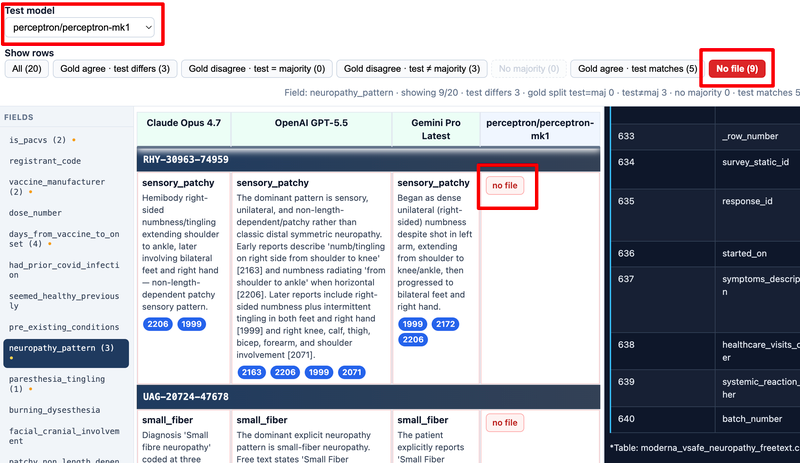
When a model has no published assessment for that registrant, the cell shows a no file indicator.
The No file filter lists registrants where the test model (or another side) is missing from the published dataset for the active field.
Recommended Review Session Workflow
Recommended Review Session Workflow
A typical pass through gold review:
- Confirm the stats line shows registrant and field counts (the page has finished loading assessments).
- Select test model you are evaluating.
- Scan field tabs with mismatch counts—often
is_pacvs,neuropathy_pattern,multi_system_count,recommend_compensation. - Set filter to Gold agree · test differs and read each row: gold cells, then test cell, then citations in the source pane.
- Switch to Gold disagree · test ≠ majority for rows where gold models themselves disagree.
- Use No file to see registrants missing a model in the published bundle.
- Record findings outside the tool (notes or spreadsheet)—the UI is read-only and does not edit assessments.
To compare any two models (not gold-vs-test), see Chapter 3 — LLM Comparison Tool.
LLM Comparison Tool
What comparison.html Is
What comparison.html Is
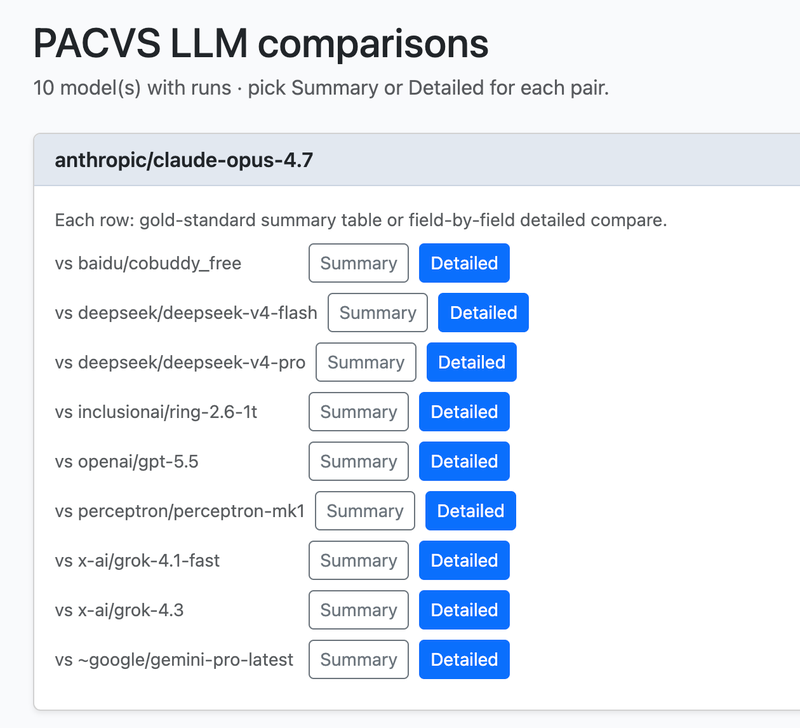
comparison.html is the entry hub on this site for exploring any two LLM runs, alongside gold review and summary.
The page title is PACVS LLM comparisons. It lists every model that has assessment data in the published bundle. For each opponent (“vs …”) on a model card you get two links:
| Link | Page | What you get |
|---|---|---|
| Summary | summary.html |
One field-level table: how often each model aligns with the three-model gold panel (counts per PACVS field) |
| Detailed | llm_compare/llm_compare.html |
Registrant-by-registrant EXACT cells (value, explanation, citation pills) for that pair |
Both pages accept optional query parameters left and right (URL-safe model ids, for example deepseek__deepseek-v4-flash and openai__gpt-5.5) so a pair can be bookmarked or linked from the index.
Use the comparison index when you want to pick a pair before drilling in—not when you are scoring one candidate against the fixed gold panel in a single test column (Chapter 2 — Gold Review Tool).
What summary.html Is
What summary.html Is
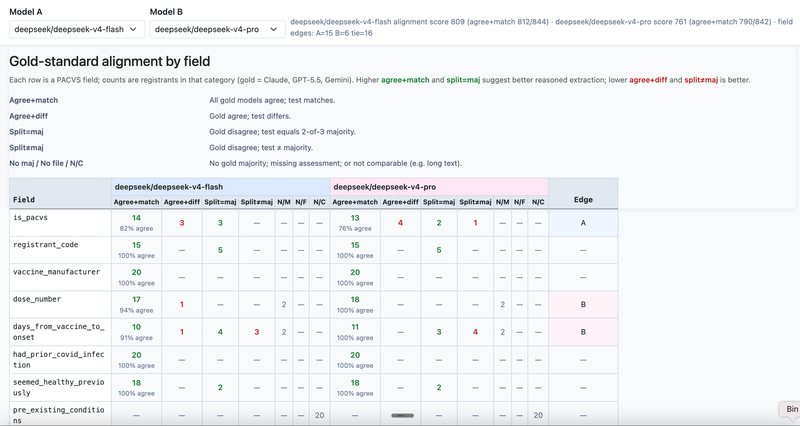
summary.html (PACVS LLM summary vs gold) rolls up gold-review logic across the whole manifest for two models at once, without scrolling every registrant.
- Model A and Model B dropdowns (sticky toolbar) choose which runs to score—typically two candidates you want to compare (for example DeepSeek v4 Flash vs DeepSeek v4 Pro).
- Each row is one PACVS field from
gold_review_config.json. - Columns count registrants in each outcome bucket, using the same three gold models (Claude Opus, GPT-5.5, Gemini) as the reference panel:
- Agree+match — all gold agree; this model matches (good).
- Agree+diff — gold agree; this model differs (bad).
- Split=maj — gold disagree; this model matches the 2-of-3 majority (good).
- Split≠maj — gold disagree; this model ≠ majority (bad).
- N/M, No file, N/C — no gold majority, missing JSON, or not comparable (long text).
The table shows Model A and Model B side by side per field so you can see which model tracks gold better before opening Detailed compare. Sticky header rows keep field names and column labels visible while scrolling long field lists.
Open it from comparison.html → Summary on any pair, or directly with ?left=…&right=… on summary.html. Chapter 4 documents the underlying gold-agree / gold-split rules this summary counts.
Gold Review vs Summary vs Detailed Compare
Gold Review vs Summary vs Detailed Compare
| Tool | Page | Granularity | Best for |
|---|---|---|---|
| Gold review | gold_review.html |
Per registrant, one test vs three gold columns | Adjudicate one candidate; row filters (agree/differ, majority) |
| Comparison index | comparison.html |
N/A (navigation) | Browse models; launch Summary or Detailed for a pair |
| Pair summary | summary.html |
Per field, counts across all registrants | Which PACVS fields each model gets right vs gold; compare two models at a glance |
| Pair compare (Detailed) | llm_compare/llm_compare.html |
Per registrant, left vs right only | EXACT cells, citations, and Differ filter for one pair |
Gold review and summary both use the three-model gold panel; summary aggregates it, while gold review lets you inspect individual people. Detailed compare does not use gold columns—it only asks whether left and right disagree on each short field.
Detailed compare and gold review share the same EXACT cell layout (value, explanation, citation pills) and markdown pane. Summary is the numeric rollup layer above them—ideal for choosing which fields or models deserve a deep read next.
Pair Compare Layout and Model Selectors
Pair Compare Layout and Model Selectors
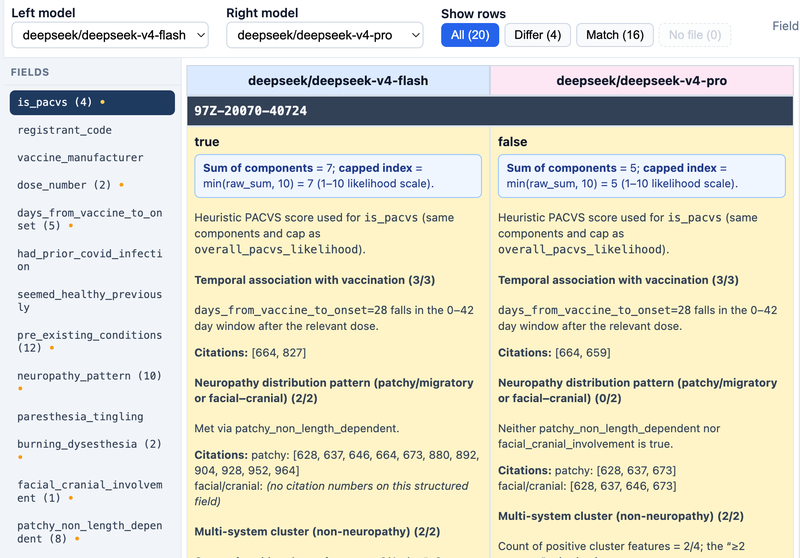
The pair compare page mirrors gold review’s layout:
- Toolbar — Left model and Right model dropdowns (changing either updates the URL query params
leftandright). - Show rows — All, Differ, Match, No file (either side missing an assessment).
- Field sidebar — one tab per PACVS field; tabs with any differences show an orange •.
- Table — two columns (left blue-tinted header, right pink-tinted), one data row per field for the selected registrant.
- Markdown pane — source narrative with citation jump targets.
Default pair comes from config (baseline deepseek/deepseek-v4-flash vs another model with runs when available).
Row Colors and Short-Value Diff Rules
Row Colors and Short-Value Diff Rules
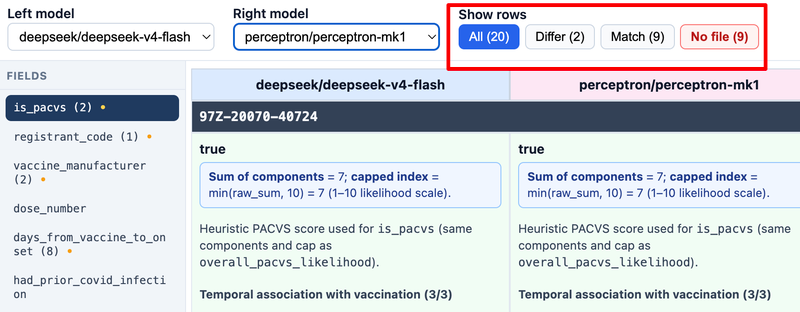
For the active field, each registrant row is classified:
| Outcome | Filter | Row styling |
|---|---|---|
| Left and right values match (comparable) | Match | Green |
| Comparable but different | Differ | Yellow |
| Missing assessment on either side | No file | Red tint |
Comparable keys use the same idea as gold review: serialized values ≤ diffMaxLen characters (default 30 in this app) get automatic match/differ highlighting. Longer free-text fields still display explanations but may be not comparable for filters.
Field tabs show a • and difference counts so you can jump to fields where the two models disagree most often.
Citations and Source Markdown
Citations and Source Markdown
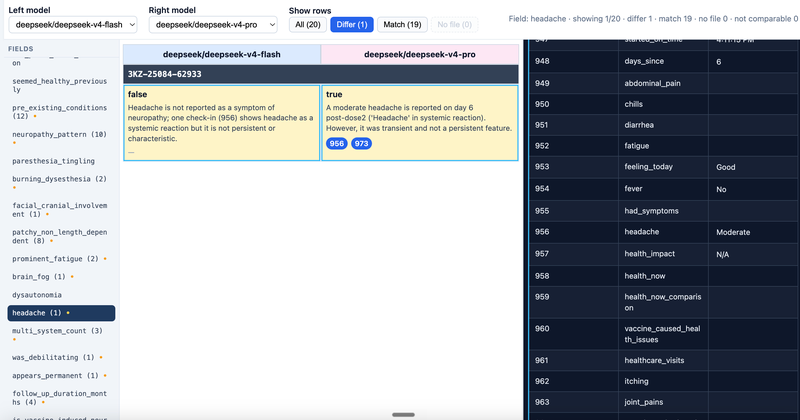
Interaction matches gold review:
- Select a registrant heading or citation pill → loads that registrant’s source narrative in the right pane.
- Click a pill’s anchor → scrolls to
cite-{slug}-{n}and briefly highlights the row.
Use this to settle why two models diverged: read both cells, then verify the cited sentences in the V-safe narrative (see Appendix — V-safe).
Recommended Workflow and Link Back to Gold Review
Recommended Workflow and Link Back to Gold Review
- Start from
comparison.htmlto see which models have full runs in the bundle. - For a pair of interest (for example DeepSeek v4 Flash vs a closed-weight model), open Summary first on
summary.html. - Scan per-field counts: note fields with high Agree+diff or Split≠maj for either model; compare Model A vs Model B columns on the same row.
- Open Detailed (
llm_compare.html) for the same pair; filter to Differ and walk registrants on those high-signal fields (is_pacvs,recommend_compensation, cluster booleans). - For each disagreement, use citation pills and the source pane to see which model aligns with the narrative.
- For case-level gold consensus (one test model, one registrant at a time), switch to gold review (Chapter 2) with the same model as test and gold-agree / gold-split filters (Chapter 4).
Summary answers “how often, by field?”; Detailed answers “who and why?”; gold review answers “how does this test model behave vs gold on each person?”
Comparison Logic
Comparable vs Not Comparable Rows
Comparable vs Not Comparable Rows
This chapter documents comparison rules in gold_review.html (Chapter 2). Those same gold-agree / gold-split / majority categories are counted per field in summary.html (Chapter 3). The LLM pair compare (Detailed) tool uses a simpler left/right Differ / Match model without gold-majority filters.
For the active field, each registrant gets a rowMeta classification. A row is comparable only when:
- Every gold model has an ok snapshot for the field, and each gold value’s
compareKeyis defined (serialized length ≤compareMaxLen, default 20). - The test model also has an ok snapshot with a defined
compareKey.
If any gold value is missing, too long for exact compare, or the test file is absent, the row may be not comparable (neutral gray background). You can still read explanations and citations, but automatic match/mismatch filters will not treat it as a vote.
Long free-text fields (for example lengthy alternative_explanations_considered) are displayed for human review without forcing a boolean agree/disagree badge.
Gold Agree and Test Match vs Mismatch
Gold Agree and Test Match vs Mismatch
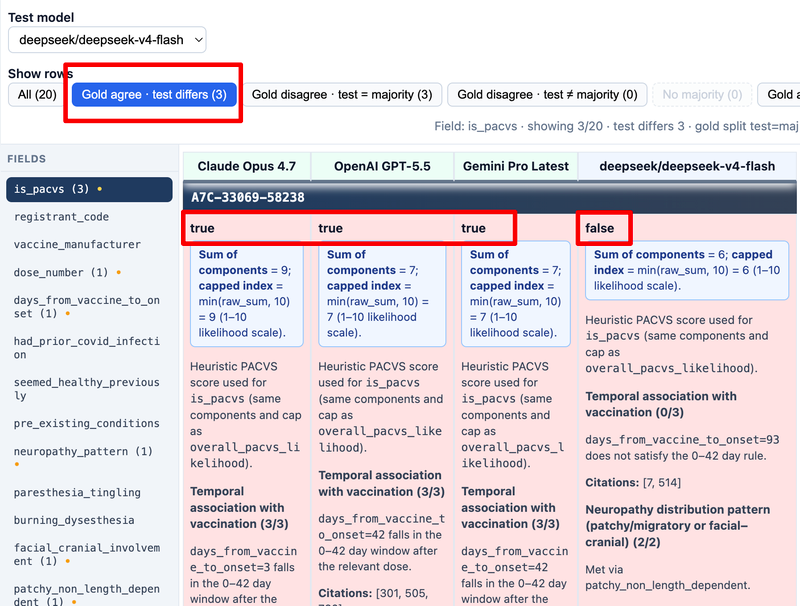
When gold models agree (all compareKey values equal):
| Outcome | Filter | Row styling |
|---|---|---|
| Test equals gold | Gold agree · test matches | Green (row-gold-test-match) |
| Test differs | Gold agree · test differs | Red (row-test-mismatch) |
Field tabs show a • and count of mismatches across registrants for that field—useful for spotting systematic weaknesses in a test model (for example always missing dysautonomia).
The stats line repeats aggregate counts for the active field so you do not have to mentally tally visible rows.
When Gold Models Disagree (Gold Split)
When Gold Models Disagree (Gold Split)
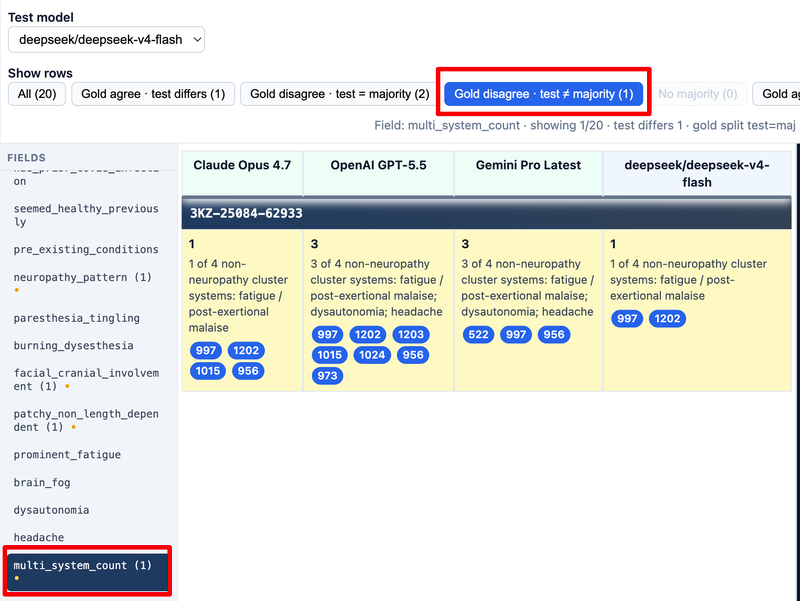
When gold compareKey values differ, the row is a gold split (yellow background). The UI then computes a majority key among gold values:
- Majority requires strictly more than half of gold votes for one key.
- Ties or no clear winner → no majority (dedicated filter).
For gold splits with a majority, the test model is classified as:
- Gold disagree · test = majority — test matches the plurality gold answer.
- Gold disagree · test ≠ majority — test picks a different short value than the gold majority.
These cases are where human adjudication matters: gold models may be interpreting ambiguous narrative differently, and the test model’s explanation + citations should be read against source markdown.
Filter Button Counts and Highlight States
Filter Button Counts and Highlight States
Filter buttons show live counts, for example Gold agree · test differs (4).
Special styling:
- No file — dashed/low opacity when count is 0; solid red tint when any test assessment is missing (
has-absent). - No majority — dashed when 0; amber highlight when gold splits lack a majority.
The active filter button uses blue fill. Switching filters does not change the selected field—only which registrant rows appear in the table.
not comparable count appears in the stats line but is not a separate filter button; use All and visual gray rows to spot them.
compareKey Rules and DISPLAY_FIELDS
compareKey Rules and DISPLAY_FIELDS
compareKey is derived from the displayed value string:
function compareKey(value, maxLen) {
  const disp = valueDisplay(value);
  if (disp.length > maxLen) return null;
  return disp;
}
Implications:
- Booleans and small enums compare reliably (
true/false, pattern names). - Long JSON blobs or paragraphs return
nullkeys → row often not comparable for automation. - Config key
compareMaxLeningold_review_config.jsondefaults to 20 (set when generating the bundle).
DISPLAY_FIELDS is the full tuple of PACVSNeuropathyCase.model_fields.keys()—every schema field gets a sidebar tab, including compensation and objection fields.
Reading PACVS Explanation HTML in Cells
Reading PACVS Explanation HTML in Cells
Explanations often include structured PACVS markup generated during post-processing:
<p class="pacvs-summary">— short top-line rationale (shown in the blue cell-sum block when present).pacvs-score-explanation/pacvs-score-block— heuristic breakdown.pacvs-criterion,cluster-line— criterion-level detail.
The UI strips duplicate leading summaries from the explanation block when a summary is promoted to cell-sum, so you see the headline once and the longer reasoning below.
When comparing models, read value for the decision, summary for the headline, and full explanation for auditability—especially for is_pacvs and recommend_compensation, which must stay internally consistent in the schema.
How Comparison Logic Connects to Extraction Quality
How Comparison Logic Connects to Extraction Quality
Use comparison outcomes iteratively:
- High mismatch rate on one field → inspect prompt coverage or Pydantic field descriptions for that field.
- Gold split + test = majority → test may be reasonable even when gold disagree; adjudicate manually.
- Gold split + test ≠ majority → test may be inventing a value; check citations in markdown.
- Many no file → incomplete test run; resume extraction before drawing conclusions.
The gold review UI is a measurement instrument, not the source of truth—final PACVS decisions still require clinician judgment and source chart review.
Code Walkthrough
Scripts and Data Flow
Scripts and Data Flow
The neuropathy tooling in neuropathy_tools/ implements EXACT end to end: V-safe registrant markdown (source citation tables) → structured PACVS assessments → review pages with comparison citation tables (Chapters 1–4).
| Stage | Main modules |
|---|---|
| Markdown on disk | sync_neuropathy_markdown_for_eval_manifest.py, manifest CSV |
| LLM extraction | neuropathy_openrouter_core.py, vsafe_disease_common.py, run_neuropathy_*.py |
| Parse and validate | deepseek_v4_flash_neuropathy_extract_json.py, pydantic_vsafe_neuropathy.py |
| Source pane HTML | generate_llm_compare_html.py, generate_gold_review_app.py |
| Compare UIs | generate_llm_compare_app.py, generate_gold_review_app.py, generate_summary_app.py |
This chapter walks through the methods in that order. Each block is trimmed to roughly one screen; names and logic match the repository.
V-safe Markdown Input
V-safe Markdown Input
Each registrant is a markdown file (typically pfizer/<CODE>.md or moderna/<CODE>.md). The text is free narrative plus pipe tables whose first column is a citation number the LLM must reference in citation fields—the source citation table in the EXACT pattern (Chapter 1).
The eval manifest (data/neuropathy_llm_eval_bf20.csv) lists which registrants are in the bundle and how to find each file. Downstream code never guesses paths blindly—it resolves them from manifest columns.
Copying Markdown for the Manifest
Copying Markdown for the Manifest
sync_neuropathy_markdown_for_eval_manifest.py copies source markdown into the tree used by extraction and review (neuropathy/<manufacturer>/<code>.md when that layout is active):
for row in rows:
    code = (row.get("registrant_code") or "").strip()
    mfr = (row.get("vaccine_manufacturer") or "").strip().lower()
    if not code or mfr not in ("pfizer", "moderna"):
        continue
    src = src_root / mfr / f"{code}.md"
    dest = dest_root / mfr / f"{code}.md"
    if not src.is_file():
        missing_src.append(str(src))
        continue
    dest_dir.mkdir(parents=True, exist_ok=True)
    shutil.copy2(src, dest)
    copied += 1
Resolving Markdown Paths from the Manifest
Resolving Markdown Paths from the Manifest
neuropathy_openrouter_core.resolve_markdown_path maps a manifest row to a concrete .md file:
def resolve_markdown_path(row: Dict[str, str], markdown_dir: Path) -> Path:
    sub = (row.get("markdown_subpath") or "").strip()
    if sub:
        return (markdown_dir / sub).resolve()
    rel = (row.get("markdown_relpath") or "").strip()
    if rel:
        parts = Path(rel).parts
        if len(parts) >= 3 and parts[0] == "vsafe_md" and parts[1] == "neuropathy":
            return (markdown_dir / Path(*parts[2:])).resolve()
        return (markdown_dir / Path(rel).name).resolve()
    mfr = (row.get("vaccine_manufacturer") or "").strip().lower()
    code = (row.get("registrant_code") or "").strip()
    return (markdown_dir / mfr / f"{code}.md").resolve()
load_manifest attaches _markdown_path on each row for the async worker.
The Citable Field Wrapper
The Citable Field Wrapper
base_models.Citable is the per-field shape the LLM must emit and Pydantic validates:
class Citable(BaseModel, Generic[T]):
    value: T
    citation: Union[int, List[int]] = Field(
        ..., description="Citation number(s) ≥1 or empty list []"
    )
    explanation: str = Field(
        ..., description="Clear reasoning with direct quote or reference from free-text"
    )

    @field_validator("citation")
    @classmethod
    def validate_cit(cls, v):
        if isinstance(v, int):
            if v < 1:
                raise ValueError("citation int must be ≥1")
            return v
        for c in v:
            if not isinstance(c, int) or c < 1:
                raise ValueError("all list citations must be int ≥1")
        return v
PACVSNeuropathyCase in pydantic_vsafe_neuropathy.py composes dozens of CitableBool, CitableStr, etc.
Building the OpenRouter Request
Building the OpenRouter Request
vsafe_disease_common.create_api_payload builds the chat request: system instructions from the schema, user message with the full markdown and model_json_schema():
def create_api_payload(
    markdown_content: str, disease_name: str, pydantic_model: Type[BaseModel]
) -> Dict:
    system_instruction = get_system_instruction(disease_name, pydantic_model)
    prompt = create_prompt(markdown_content, disease_name, pydantic_model)
    return {
        "model": os.getenv("OPENROUTER_DEFAULT_MODEL", "x-ai/grok-4.1-fast"),
        "messages": [
            {"role": "system", "content": system_instruction},
            {"role": "user", "content": prompt},
        ],
    }
neuropathy_openrouter_core.create_payload wraps this for neuropathy and sets the caller’s model id.
Processing One Registrant
Processing One Registrant
process_one is the unit of work: read markdown, call OpenRouter, validate, write artifacts under neuropathy_llm_runs/<sanitized_model>/:
async def process_one(client, semaphore, output_dir, row, model_id):
    code = row["registrant_code"]
    md_path = Path(row["_markdown_path"])
    dest_dir = output_dir / sanitize_model_id(model_id)
    async with semaphore:
        if _has_resumable_assessment(dest_dir, code):
            return {..., "resume": "skipped_existing", "pydantic_ok": True}

        markdown = md_path.read_text(encoding="utf-8")
        raw, elapsed, content_err = await call_model(client, markdown, model_id)
        raw_path = dest_dir / f"{code}.openrouter_response.json"
        raw_path.write_text(json.dumps(raw, indent=2, ensure_ascii=False), encoding="utf-8")

        pydantic_json, _assessment, content_data, validation_error = (
            parse_response_json_to_pydantic(
                json.dumps(raw, ensure_ascii=False), PACVSNeuropathyCase
            )
        )
        if pydantic_json and _assessment is not None:
            (dest_dir / f"{code}.assessment.json").write_text(
                pydantic_json, encoding="utf-8"
            )
        else:
            # May write CODE.assessment_partial.json when JSON parses but Pydantic fails
            pass
Valid assessment.json files are skipped on later runs unless NEUROPATHY_FORCE_RERUN=1.
Parsing the Model Response
Parsing the Model Response
parse_response_json_to_pydantic pulls JSON from the chat completion, strips optional fenced code blocks, and validates with Pydantic:
def parse_response_json_to_pydantic(response_json_str, pydantic_model):
    response_data = json.loads(response_json_str)
    content = response_data["choices"][0]["message"]["content"]
    content = strip_markdown_code_blocks(content)
    content_data = json.loads(content)

    try:
        assessment = pydantic_model(**content_data)
        pydantic_json_str = json.dumps(assessment.model_dump(), indent=2)
        return pydantic_json_str, assessment, None, None
    except ValidationError as e:
        return "", None, content_data, e
On success, model_dump() includes fields normalized in evaluate() (below).
Derived PACVS Fields After Validation
Derived PACVS Fields After Validation
PACVSNeuropathyCase.evaluate runs after the LLM JSON is parsed. It reconciles multi_system_count, computes the heuristic score, and sets is_pacvs and overall_pacvs_likelihood with HTML explanations:
@model_validator(mode="after")
def evaluate(self):
    multi = sum([
        1 if self.prominent_fatigue.value else 0,
        1 if self.brain_fog.value else 0,
        1 if self.dysautonomia.value else 0,
        1 if self.headache.value else 0,
    ])
    self.multi_system_count = CitableInt(
        value=multi, citation=multi_citations, explanation=multi_expl
    )

    onset_days = self.days_from_vaccine_to_onset.value if self.days_from_vaccine_to_onset else None
    score = 0
    if isinstance(onset_days, int) and 0 <= onset_days <= 42:
        score += 3
    if self.patchy_non_length_dependent.value or self.facial_cranial_involvement.value:
        score += 2
    if multi >= 2:
        score += 2
    if self.other_common_causes_ruled_out.value:
        score += 2

    self.overall_pacvs_likelihood = CitableInt(
        value=min(score, 10), citation=likelihood_citations, explanation=expl_likelihood
    )
    self.is_pacvs = CitableBool(
        value=(score >= 7), citation=likelihood_citations, explanation=expl_is_pacvs
    )
recommend_compensation stays as the model wrote it; it is not score-derived.
Per-Model Runner Entry Point
Per-Model Runner Entry Point
Each run_neuropathy_<model>.py is a thin wrapper around one OpenRouter model id:
from neuropathy_openrouter_core import run_single_openrouter_model

OPENROUTER_MODEL_ID = "deepseek/deepseek-v4-flash"

if __name__ == "__main__":
    raise SystemExit(run_single_openrouter_model(OPENROUTER_MODEL_ID))
run_single_openrouter_model loads the manifest, prints skip/pending counts, runs asyncio.run(run_all_for_model(...)), and writes summary/summary__<model>.csv.
Markdown to HTML for the Source Pane
Markdown to HTML for the Source Pane
Review tools show source text as HTML with cite anchors for pills. _markdown_body_to_html walks lines: pipe tables become <table> rows with id="cite-{slug}-{n}" on the first column; headings and paragraphs are escaped:
def _markdown_body_to_html(text: str, reg_slug: str) -> str:
    lines = text.splitlines()
    out = []
    i = 0
    while i < len(lines):
        parsed = _try_parse_pipe_table(lines, i, reg_slug)
        if parsed is not None:
            tbl, ni = parsed
            out.append(tbl)
            i = ni
            continue
        stripped = lines[i].strip()
        if stripped.startswith("## "):
            out.append(f"<h2 class='md-h'>{html.escape(stripped[3:].strip())}</h2>")
        elif stripped:
            out.append(f"<p class='md-p'>{html.escape(lines[i])}</p>")
        i += 1
    return "\n".join(out)
_markdown_pane_html wraps that fragment with a pane header for one registrant file.
Writing Markdown Snippets for Review
Writing Markdown Snippets for Review
When the gold review or LLM compare bundle is built, generate_gold_review_app._write_markdown_snippets pre-renders every manifest registrant:
def _write_markdown_snippets(manifest_rows, md_dir: Path) -> int:
    MARKDOWN_DIR.mkdir(parents=True, exist_ok=True)
    for row in manifest_rows:
        code = (row.get("registrant_code") or "").strip()
        reg_slug = cmp._reg_anchor_slug(code)
        md_path = resolve_markdown_path(row, md_dir)
        fragment = cmp._markdown_pane_html(reg_slug, md_path)
        out = MARKDOWN_DIR / f"{reg_slug}.html"
        out.write_text(fragment, encoding="utf-8")
    return n
The browser loads these fragments in the review panes; assessments are fetched separately from per-model JSON.
Review App Config Generation
Review App Config Generation
generate_gold_review_app and generate_llm_compare_app emit static HTML plus JSON config (registrant list, field names, model directories, compare limits). The pages fetch *.assessment.json at runtime—the walkthrough above is how those files are produced.
| Output | Role |
|---|---|
gold_review_config.json |
Registrants, PACVS field list, gold vs test model dirs |
comparison.html |
Index of model pairs; links to Summary and Detailed |
summary.html |
Field-level gold-alignment counts for two models (from generate_summary_app.py) |
llm_compare/llm_compare.html |
Detailed left/right pair compare |
llm_compare/llm_compare_config.json |
Same manifest, all models, default left/right pair |
markdown/{slug}.html |
Source pane fragments |
neuropathy_llm_runs/<model>/<REG>.assessment.json |
Reasoned extraction per model |
Earlier chapters document using the review UIs; this chapter documents how the Python layer creates their inputs.
How This Chapter Fits the Set
How This Chapter Fits the Set
| Topic | Chapter |
|---|---|
| EXACT, concepts, gold-vs-test purpose | Chapter 1 — Reasoned Extraction Overview |
| Using gold review | Demo + Chapter 2 |
comparison.html, summary.html, pairwise compare |
Chapter 3 |
| Row filter semantics | Chapter 4 |
| V-safe narratives and PACVS rubric | Appendices |
| Python extraction and markdown prep | Code Walkthrough (this chapter) |
Appendix — V-safe
What V-safe Is in This Project
What V-safe Is in This Project
V-safe is the CDC’s smartphone-based active monitoring program for COVID-19 vaccine safety. Participants enroll after vaccination and can report health effects, check-ins, and follow-up outcomes over time.
This tutorial project does not replicate the full V-safe platform. It uses a curated slice of neuropathy-related registrant narratives that were prepared for research and model evaluation:
- Each registrant has a stable code (for example a V-safe identifier used in manifests).
- Narratives are stored as markdown (organized by manufacturer such as Pfizer or Moderna in source trees).
- The gold review tool shows that same narrative in the right-hand pane when you click citations.
When you read “V-safe data” here, think registrant-level text plus structured fields extracted from it, not live CDC systems.
Registrant Narratives and the Manifest
Registrant Narratives and the Manifest
The eval set is driven by a manifest CSV (for example neuropathy_llm_eval_bf20.csv):
- Lists which registrants are in the gold review bundle.
- Ties each code to a markdown file the LLM read during extraction.
- May reference prior adjudication JSON used to balance the sample (PACVS true/false × compensation recommend true/false quadrants).
Typical layout on disk:
data/vsafe_md/neuropathy/<manufacturer>/<REG>.md
# or legacy: neuropathy/<manufacturer>/<REG>.md
In gold review, narratives appear as pre-rendered HTML in the source pane—the source citation table in the EXACT workflow. Citation pills jump to numbered rows so you can verify model claims against the original story (see Chapter 1, EXACT).
What a Registrant Story Usually Contains
What a Registrant Story Usually Contains
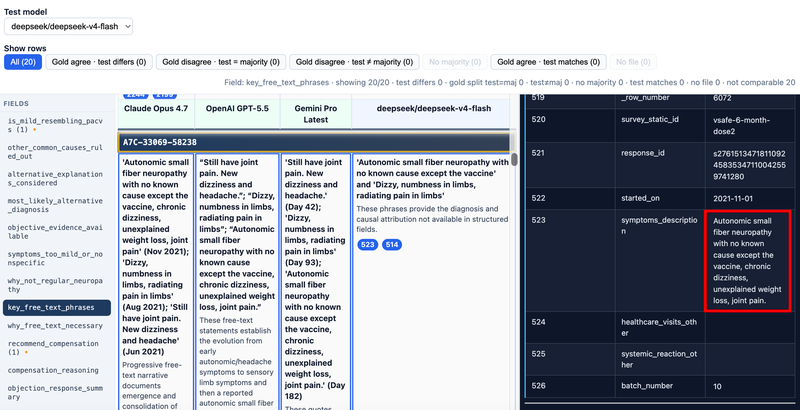
Narratives are free text with uneven structure. They often mention:
- Vaccine product and dose (manufacturer, dose number, timing).
- Onset interval — days from vaccination to first neuropathy or related symptoms.
- Symptom quality — tingling, burning, facial involvement, patchy vs length-dependent distribution.
- Non-neuropathy symptoms — fatigue, brain fog, dysautonomia-like symptoms, headache.
- Course and impact — debility, duration of follow-up, testing if any.
- Competing explanations — prior COVID, diabetes, B12, thyroid, or other causes discussed in the chart.
The PACVS schema (Appendix B) maps these story elements into citable fields. Reasoned extraction requires the model to point citation numbers at the sentences that support each field.
How V-safe Relates to Assessment JSON
How V-safe Relates to Assessment JSON
For each registrant and model, the pipeline writes:
structured assessment JSON for that model and registrant (loaded by the review pages)
That file is a structured PACVSNeuropathyCase dump: every field has value, explanation, and citation (see Chapter 1). The source of truth for facts remains the V-safe narrative; the JSON is an auditable interpretation.
Gold review compares multiple models’ JSON against the same underlying narrative. When gold models agree but a test model differs, you return to the markdown pane to see which reading of the story is more defensible.
Privacy, Scope, and Limits of This Appendix
Privacy, Scope, and Limits of This Appendix
- Identifiers in tutorials and tools are study codes, not instructions to re-identify individuals.
- The bf20 (and similar) manifests are small balanced samples for method comparison—not the full V-safe database.
- LLM extractions and gold review support research QA; they do not replace clinician review or official pharmacovigilance workflows.
Use this appendix when a slide cites “registrant,” “manifest,” or “source markdown” and you need grounding in where that text came from. For tool mechanics, stay in Chapters 2–3; for PACVS clinical framing, see Appendix — PACVS.
Appendix — PACVS
What PACVS Means Here
What PACVS Means Here
In this project, PACVS (Post-Acute COVID-Vaccination Syndrome) names a clinical pattern used to classify certain neuropathy presentations reported after COVID-19 vaccination—especially when symptoms cluster with other systemic features and track closely in time with a dose.
The codebase encodes that construct as PACVSNeuropathyCase: a comprehensive Pydantic schema in pydantic_vsafe_neuropathy.py with dozens of citable fields and a top-level boolean is_pacvs.
Important distinctions the schema preserves:
| Concept | Role |
|---|---|
PACVS neuropathy (is_pacvs true) |
Meets project threshold for “clear PACVS” pattern on structured criteria |
| Vaccine-induced neuropathy, not PACVS | Neuropathy after vaccine but not full PACVS pattern |
| Mild resembling PACVS | Some overlap but low likelihood |
| Ordinary / alternative neuropathy | Alternative diagnoses and “why not regular neuropathy” reasoning |
Gold review helps you compare how different LLMs apply the same PACVS rubric to the same V-safe narrative.
Clinical Themes Reflected in the Schema
Clinical Themes Reflected in the Schema
PACVSNeuropathyCase groups fields into themes you will see as field tabs in gold review:
- Timing and vaccine context — manufacturer, dose, days from vaccine to onset (≤42 days matters for heuristics).
- Neuropathy pattern — small-fiber, patchy/non-length-dependent, facial/cranial, burning, paresthesia, etc.
- Multi-system cluster — fatigue/PEM, brain fog, dysautonomia, headache (count reconciled to four booleans).
- Severity and course — debilitating, appears permanent, follow-up months.
- Objections and alternatives — prior COVID, pre-existing conditions, common causes ruled out, alternative diagnoses.
- Evidence and narrative — objective testing, key free-text phrases, why structured fields are insufficient alone.
- Compensation stance —
recommend_compensationandcompensation_reasoning( not auto-derived from the PACVS score). - Overall assessment —
overall_pacvs_likelihood(1–10),confidence,final_conclusion,objection_response_summary.
Reasoned extraction (EXACT) fills each field with value + explanation + citation so reviewers can audit the rubric in citation tables, not only the headline label.
Heuristic PACVS Score and is_pacvs Threshold
Heuristic PACVS Score and is_pacvs Threshold
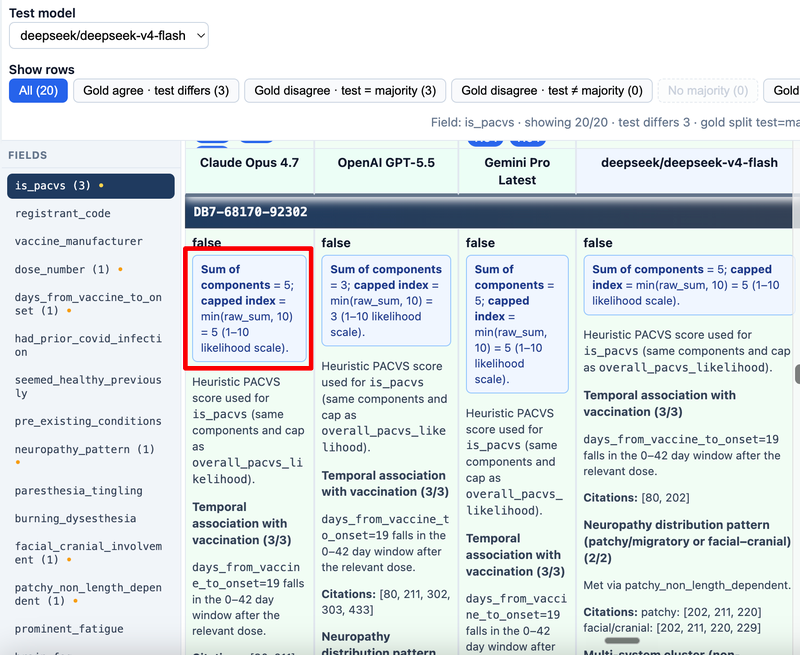
After the LLM returns a case, evaluate() on PACVSNeuropathyCase recomputes derived fields so scoring stays consistent. The additive heuristic (capped at 10) includes:
| Component | Points (when met) |
|---|---|
| Clear temporal link (onset 0–42 days after relevant dose) | +3 |
| Patchy/non-length-dependent or facial/cranial involvement | +2 |
| Multi-system cluster count ≥ 2 (of fatigue, brain fog, dysautonomia, headache) | +2 |
| Other common causes ruled out | +2 |
overall_pacvs_likelihood=min(raw_sum, 10).is_pacvs= raw sum ≥ 7 (with current rules, raw sum does not exceed 9).
Explanations in assessment JSON often include HTML pacvs-score-block sections showing each criterion’s points and citations. Gold review surfaces the pacvs-summary line at the top of a cell when present.
This heuristic is transparent and repeatable; it is still one layer in a larger clinical judgment encoded in free-text fields.
Fields That Stay LLM-Judgment vs Auto-Derived
Fields That Stay LLM-Judgment vs Auto-Derived
Some fields are normalized in code after extraction:
multi_system_count— counted from the four cluster booleans; explanation lists which systems apply.overall_pacvs_likelihoodandis_pacvs— from the heuristic above (explanations generated in code).objection_response_summary— auto-filled only whenis_pacvsis true; empty otherwise by design.
Others must remain consistent but not score-derived:
recommend_compensation/compensation_reasoning— independent clinical judgment; must agree with each other and with the overall story infinal_conclusion.alternative_explanations_considered,key_free_text_phrases,why_not_regular_neuropathy— long-form reasoning; gold review usually does not auto-compare these (string length > compare key limit).
When reviewing in gold review, treat red mismatch rows on short fields as automatic QA signals; treat long-text fields as manual read alongside citations.
How PACVS Connects to Gold Review Filters
How PACVS Connects to Gold Review Filters
Chapter 4 describes gold-review comparison mechanics. In PACVS terms:
- Gold agree · test differs — three reference models agree on a rubric field (for example
is_pacvs= true) but your test model chose differently; high priority for error analysis. - Gold disagree · test = majority — gold panel split, but test aligned with plurality; may still be clinically debatable.
- Gold disagree · test ≠ majority — test disagrees with both a split gold panel and the majority gold value.
Start PACVS review on is_pacvs, overall_pacvs_likelihood, neuropathy_pattern, multi_system_count, and recommend_compensation, then drill into symptom booleans and objection fields.
Using This Appendix With the Main Chapters
Using This Appendix With the Main Chapters
| If you need… | Read… |
|---|---|
Gold review feature map (gold_review.html) |
Demo — Gold Review |
| EXACT, citable JSON, pipeline, gold vs test | Chapter 1 — Reasoned Extraction Overview |
Running gold_review.html, citations |
Chapter 2 — Gold Review Tool |
comparison.html, summary.html, pairwise llm_compare |
Chapter 3 — LLM Comparison Tool |
| Gold-review row colors and filters | Chapter 4 — Comparison Logic |
| Python extraction and markdown prep | Chapter 5 — Code Walkthrough |
| Where registrant stories come from | Appendix — V-safe (this file’s companion) |
| What PACVS fields and scoring mean | Appendix — PACVS |
The appendices are background for interpretation; they are not required to click through the UI, but they explain why the schema and filters look the way they do.