

Here’s a question worth considering: what’s the most powerful thing you can open without installing anything?
A single HTML file.
Drop it in a folder, open it in a browser — the software you already have, on every computer you’ll ever touch. No Python environment. No Node.js. No npm install. No version conflicts. Almost no terminal. Just a file, a browser, and one lightweight tool you’ll install once.
This is the starting point for our AI coding course, and its a deliberate choice about what actually works for beginners — and why the gap between “learning to code” and “building something real” is much smaller than most people think.
The Barrier Nobody Talks About
Most coding courses start with setup. Install Python. Install Node. Configure your environment. Get the right version. Troubleshoot why it works on one machine and not another.
For a lot of beginners, this is where the journey ends — not because they couldn’t learn to code, but because they couldn’t get past the setup. The thing they were supposed to build is buried under three layers of infrastructure they didn’t sign up to learn.
HTML, CSS, and JavaScript sidestep almost all of this. Every modern device already has a browser. The browser already runs HTML, CSS, and JavaScript. There’s no runtime to install, no version to manage, no dependencies to resolve. You write a file, open it in a browser, and see the result.
This matters more than it sounds. When the feedback loop is that tight — edit, save, refresh — you learn faster, stay motivated longer, and spend your energy on the actual craft instead of fighting your environment.
The Building Blocks of Almost Everything
Here’s what most beginners don’t realise: HTML, CSS, and JavaScript aren’t a simplified version of “real” programming. They are the foundation that most of the software world is built on.
The website you’re reading this on? HTML, CSS, JavaScript. The dashboard your company uses to track sales? Almost certainly a JavaScript app running in a browser. The mobile app your bank built? Probably a JavaScript framework wrapped in a thin native shell. The internal tools that run operations at startups, the reporting interfaces at enterprises, the interactive docs at developer platforms — the overwhelming majority of them are, at their core, a variation on what you can build with a single HTML file.
When you learn to build in HTML, CSS, and JavaScript, you’re not learning a stepping stone. You’re learning the material that the modern software world is made of.
“Single-Page App” Doesn’t Mean Simple
The course exercises are built around a rule: everything lives in one index.html file. One file, opened in a browser, with no server required.
That constraint sounds limiting. In practice, it produces apps that are genuinely useful — and sometimes surprisingly powerful.
Here’s what a single HTML file can do without any external dependencies:
- Save data between sessions using localStorage, so nothing is lost when you close the tab
- Import and export Excel files using a library loaded from a CDN link
- Generate PDF reports ready to download and share
- Render interactive charts that update in real time as you change inputs
- Run complex calculations — payroll, budgets, financial models, tax estimates — instantly, in the browser
- Work completely offline once the page has loaded
Some of the apps built in this course are tools students can keep using after the exercise is done. A payroll calculator. A budget tracker. A financial statement builder. Not demos — actual tools, used in real workflows, that happen to be a single HTML file you can email to someone or drop on a USB drive.
That’s a meaningful thing to make.
And you will build many such tools.
The One Tool You Actually Need: Live Server in Cursor
There is one small caveat worth being upfront about.
The course setup includes a change history viewer — a file called history.html that loads before-and-after snapshots of your app at every revision, renders side-by-side diffs, and lets you preview exactly how your project evolved. For that to work, the browser needs to fetch those revision files from your local folder. And browsers, for security reasons, block that kind of local file access when you open an HTML file directly from your filesystem.

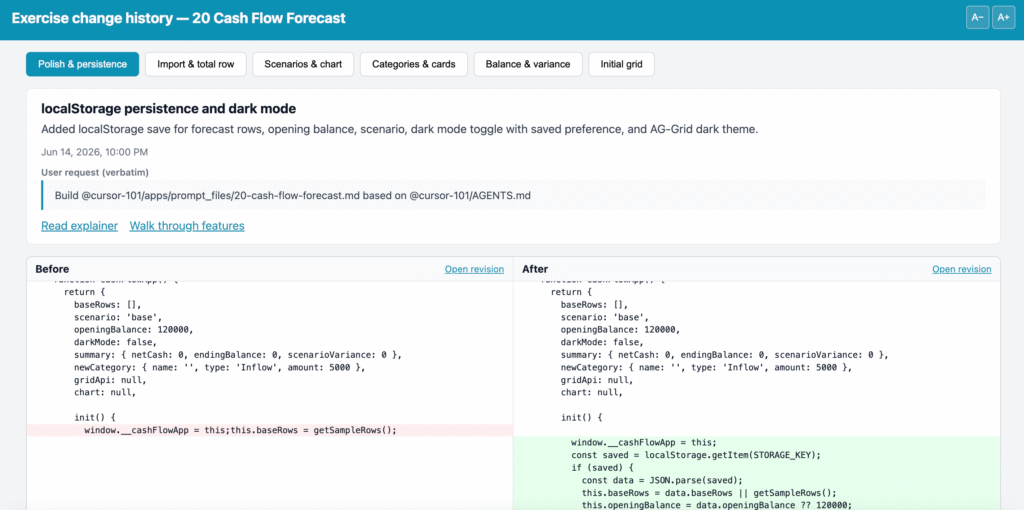
So you can’t quite just double-click history.html and have everything work. You need a local server — something that serves your files over HTTP the way a real web server would, so the browser is happy to load them.
In most coding courses, this is where things get painful. “Run python3 -m http.server.” “Install Node and run npx serve.” “Configure your dev environment.” Back to the terminal, back to the setup problem.
In this course, the answer is one click: Live Server, a free extension built into Cursor.

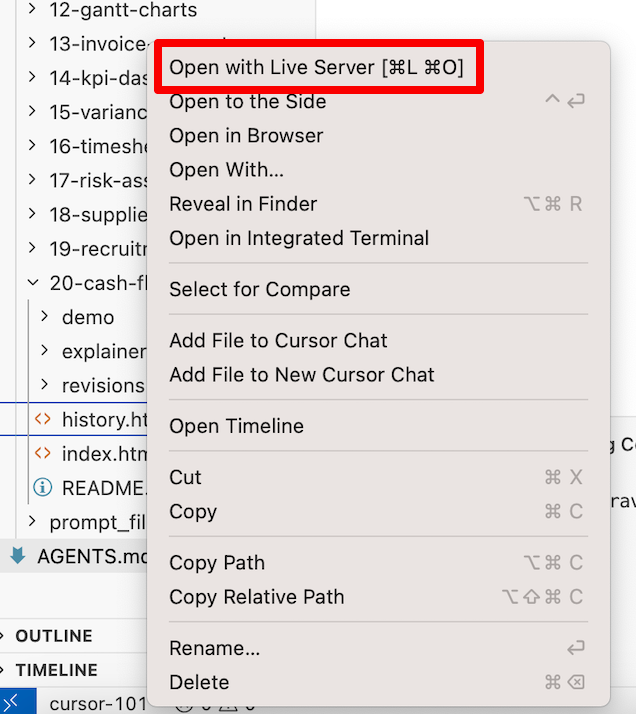
Cursor is the AI coding editor the course is built around — it’s where you’ll be working anyway. Live Server is already part of it. You right-click your HTML file, choose “Open with Live Server,” and your browser opens the page served over a proper local URL. No terminal. No command to remember. No installation beyond Cursor itself, which you were going to install anyway.
That’s the full setup for this course: Cursor (which includes Live Server) and a browser. Everything else — the apps, the history viewer, the demos, the explainers — is just HTML files that run inside those two things.
It’s worth saying what this is not: it’s not a web server you have to configure, not a cloud environment you have to sign up for, not a Docker container, not a virtual machine. It’s an editor with a built-in button that makes your files previewable. That’s it.
Why AI Makes This the Best Moment to Start Here
Building a polished, fully-featured single-page app used to require either significant experience or significant time. You needed to know enough HTML to structure it well, enough CSS to make it usable, and enough JavaScript to wire up the logic without it falling apart.
AI coding tools change the ratio entirely. You describe what you want in plain language. The AI writes the HTML, CSS, and JavaScript. You can see the result in a browser in seconds.
But — and this is where most beginner AI coding approaches go wrong — if you don’t have a structure for how the AI works, the output gets messy fast. Files appear in random places. Naming is inconsistent. Changes are hard to track. The AI “forgets” what it built last session and starts improvising.
This is what the AGENTS.md file in the course solves. It’s a plain-text instruction document that tells the AI exactly how to work: where files go, how to name things, what to save after every change, and what to check before it considers a task done. The AI reads it at the start of every session and follows it throughout.
The result is that every exercise produces not just an index.html, but a complete paper trail: before-and-after snapshots of every change, a visual change history you can open in a browser, a plain-language explainer of what the code does, and an interactive feature demo you can publish straight to WordPress. All from a single governed build process, all stored as simple files, all openable without installing anything.
What You’re Actually Learning
When you build single-page HTML apps with an AI coding agent following an AGENTS.md, you’re learning several things at once — and most of them transfer far beyond this course.
You learn how to read code. You don’t need to memorise syntax to understand what HTML, CSS, and JavaScript are doing. Seeing it produced step by step, with an explainer after each change, builds genuine comprehension faster than any tutorial.
You learn how to direct an AI. Writing rules for an agent — telling it where things go, what to name them, what quality looks like — is the real skill of AI-assisted development. It’s what separates people who get consistent results from people who get lucky sometimes.
You learn how to build things that work. Not toy examples. Not contrived exercises that only make sense in a classroom. Actual tools, in a format (a browser-openable HTML file) that anyone can use, on any device, without setup.
And you learn that the gap between “I want to build something” and “I built something” is genuinely small — if you start in the right place.
A Fixed Budget, Not an Open Tab
There’s another practical reason Cursor is the right tool for this course: it costs $20 a month, and that’s the ceiling.
That might sound like an odd thing to celebrate. But spend any time in AI coding communities and you’ll hear the same story: someone started experimenting with AI tools, got excited, started using multiple services, and ended up with a surprisingly large bill at the end of the month. Token costs on pay-per-use APIs add up fast when you’re learning — you make more mistakes, you retry more often, you explore more dead ends. That’s not a flaw in how you’re learning; it’s exactly how learning works. But it’s a bad fit for a billing model that charges you per attempt.
Cursor’s $20 plan gives you 500 prompt messages a month. That’s not unlimited — but for this course, it’s more than enough, and that’s a deliberate part of how the course is designed.
The course includes 100 ready-to-use template projects. Each template is a complete, working single-page HTML app — no prompting required to get it. You download it, open it in Cursor, and it already does something useful. The AI prompts come in when you want to personalise or extend a template: change the categories, add a column, tweak the layout, adjust the logic to fit your specific situation. Those are small, focused changes — typically one to three prompts per template, not dozens.
Do the rough maths: even if you work through all 100 templates and spend an average of three prompts customising each one, that’s 300 prompts for the entire course. Well within the monthly allowance, with headroom to spare for experimenting, asking questions, and making mistakes.
The alternative — trying to keep costs at zero — has its own hidden price. Completely free AI coding setups exist, but they typically involve stitching together multiple tools, managing API keys, working around rate limits, and spending real time troubleshooting why something that worked yesterday doesn’t work today. For a beginner, that time cost is significant. Every hour spent on tooling is an hour not spent learning to build.
$20 a month buys you out of that tradeoff. You get a single, stable environment — the same editor, the same AI, the same Live Server button — that works the same way every session. You know exactly what it costs. You know it’s enough. And your attention stays on the thing that matters: building and learning.
It’s also the kind of expense you can evaluate cleanly. After a month, you either built things and learned things, or you cancel your Cursor subscription and try other approaches. In my view, $20 plus a month of your time is a very reasonable price for figuring this out.
The Right Place to Start
Python is powerful. Node.js is powerful. Frameworks, databases, APIs — all powerful.
But none of them run in a browser your audience already has. None of them give you working, shareable output in the first session with a setup as minimal as “install Cursor, click Open with Live Server.” None of them produce files you can email to someone and have them open without instructions.
HTML does. And with an AI coding agent following a clear set of rules, the apps you can build in HTML are more capable than most people expect.
That’s why this course starts here. Not because it’s the simplest path, but because it’s the most direct one from “I want to learn AI coding” to “I built something I actually use.”
The AGENTS.md template that governs these exercises is included in the course.
You can download all the templates from my AI Coding for Beginners course
Note: as I add a batch of 10 templates, I will raise the price by $5
Once all the 100 templates have been added to my course, the final price will be $49